5 Tools For Wireless Investigations

One of the best parts of Software Defined Radio is the waterfall display. Turning the radio spectrum into a true, “hear with your eyes” experience, the waterfall helps to identify signal strength, frequency and bandwidth almost instantly, creating a whole new learning experience for those new to the world of radio.
Like most things in life, though, it’s easy to grow and evolve, and while the waterfall will remain an ever-useful tool throughout your journey, you might eventually reach a point where you simply want to learn and do more with the signals that you’re seeing on your screen.
In today’s article, we’ll look at some of the best tools available to help capture and analyse RF signals across the spectrum. Mastering these tools will give you the skills and confidence to tackle new projects and designs while knowing exactly what is going on in the world around you.
Kismet
A firm favourite of this author, Kismet is a wireless intrusion detection system that helps to identify and flag devices within your area using a range of different protocols.
Capable of detecting Bluetooth and Wifi devices in its standard configuration, it’s also capable of accepting the RTL-SDR device as a plugin that can be used to expand its functionality. This includes both aircraft tracking via ADS-B and a broad range of ISM devices.
Using a GUI interface, Kismet works best when paired with a good Bluetooth adaptor and a monitor-mode capable wireless card. Thanks to its Intrusion Detection capabilities, it’s also capable of providing alerts to identify deauth attacks or monitor mode devices within the local area.
You can also use a GPS plugin to help give an accurate location of detected emitters, and when you’re done, Kismet allows for the generation of txt and pcap files for further analysis.
You’ll need to spend some time configuring your hardware appropriately, but when done, you’ll have an extremely capable wardriving system that tells you exactly what you need to know.
Protip: Kismet works particularly well for passive packet identification and capture.
Wireshark
If you’ve spent more than a few minutes in cyber, then you’ll at least have heard of Wireshark, if not used it for analysis work previously. Wireshark isn’t just a packet sniffer, it's THE packet sniffer that has worked reliably since the late 90's.
Able to be customised with plugins, Wireshark is capable of detecting many different types of protocols while storing the packets in pcap files for later analysis.
One of the nice things about Wireshark is the ability to sort and discriminate by packet types. This means that in a sea of captured information, it becomes easy to identify packets that are worthy of analysis. The GUI will come with a slight learning curve if you’ve never used it before, but it’s worth taking the time to learn how the sorting method works and what plugins are available.
A completely open source tool, Wireshark is free, with no cost other than the time penalty for learning how to use it properly. When properly configured, you’ll have access to a useful toolbox that is able to capture and analyse all things in detail, not just WiFi and Bluetooth.
Pro Tip: Wireshark has plenty of open-source documents, and it’s been covered extensively by many before. It’s worth spending some time watching some tutorial videos to fully leverage this as a tool.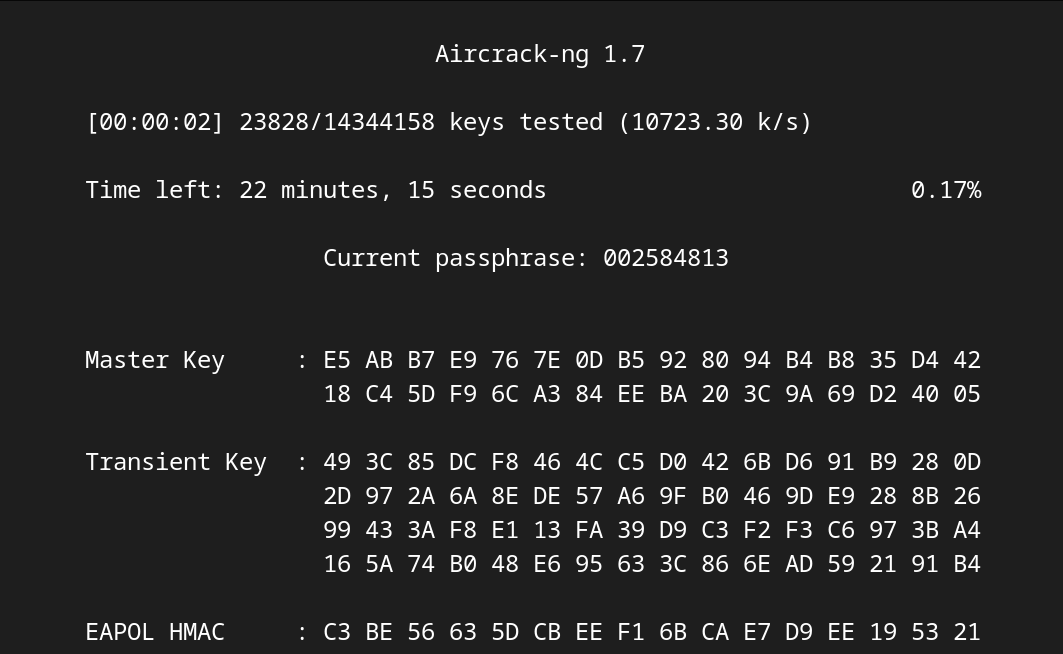
Aircrack-NG
Differing from our earlier recommendations, Aircrack-NG isn’t a single tool for analysis. Rather, it’s a complete toolkit for Wi-Fi analysis that enables you to capture traffic, identify, analyse and then attack Wifi networks.
Modern Wifi methods have evolved to have a better security posture baked into the hardware. Despite this, there’s still plenty of fun to be had applying the Aircrack-NG suite to hardware within a test lab.
Unfortunately for beginners, you’ll need at least a hint of Linux skills to get started and ideally, feel comfortable working your way through things via the terminal. You’ll also need a monitor mode-capable Wi-Fi card, as well as the skills to set it to monitor mode using the Linux distribution of your choice.
While you can run some of this software on a Windows-based VM, this can often mean encountering pass-through issues with your wifi adapter. So, to keep things simple, it’s worth running it on a bare metal install instead.
Pro Tip: If you’ve got access to an older, less secure router, set it up as a wifi testlab and then attack it. You can use aireplay-ng to carry out a deauth and then capture and crack the handshake.
Universal Radio Hacker
Software so good that we wrote about it earlier, Universal Radio Hacker is a standalone tool that’s used for bit-level analysis of captured signals. Using a modular workflow, URH then allows you to construct pipelines that help to speed up and automate the signal analysis process.
Accepting all standard off-the-shelf software-defined radio dongles means that it’s easy to get started, and the software allows you to demodulate, decode and fuzz various signals with ease.
This is particularly useful for proprietary IoT signals that operate in the ISM bands. If you’re looking to reverse engineer a signal, then URH can help you with the whole process, from capture through to retransmission.
While it isn’t as well-known as some other software packages we’ve looked at today, it’s still a well-supported tool that’s becoming more popular as time progresses.
Pro Tip: URH is installed on Dragon OS as a default program. If you’re serious about RF analysis, it’s well worth taking the time to explore this OS on bare metal.
The HackRF One Portapack
You won’t have to look far to find that the HackRF One in its Portapack format is one of our most favourite tools here at Radio Hackers. While the board only HackRF is a great tool for learning, the Mayhem-equipped Portapack gives the hardware a whole new life, making it an incredibly useful learning tool.
A hardware-based system that’s fully contained in its own right, the Portapck pairs this with software to capture nearly every transmission type that you can think of. While you won’t be doing in-depth analysis without a secondary computer, the Portapack has the ability to record both audio and pcap files that can be accessed from another machine later on.
It’s also capable of performing basic attacks like replay and ble spam out of the box, and is a fully functional transmitter that's capable of transmitting from 1MHz through to 6GHz.
While it looks like a toy and has reasonably low output power, the fact is that it’s a dedicated learning tool that has real potential for getting you in trouble if used irresponsibly.
If you’re interested in the Portapack, get one at a reduced rate by reading this article.
Pro Tip: The Portapack is a great learning tool, but play nicely and keep it in the lab to ensure that things stay legal.
A Word On Legality
Tools like the Flipper Zero can sometimes get a bad rap thanks to their occasional use for nefarious purposes. The reality is, though, that these are brilliant learning tools that play a unique role in educating people about how the radio spectrum helps to power our modern world. They are also great at making learning fun, with easy-to-use hardware and gamified learning that does away wth the boring educational strategies of old.
Despite this, though, it’s worth including a reminder on the legalities of such educational tools. The law varies from country to country, so to get the most accurate details, it’s best to check with your local government regulator.
More often than not, testing your own hardware is okay, as is testing hardware that you have been granted permission to test by the owners.
Essentially, if you’re still learning though, keeping it in the lab is usually the best way of keeping it all nice and legal. If you really want to put your skills to the test in the real world, try out some bug bounty instead.
Investigator515 explores the RF spectrum, cybersecurity, and the hidden tech behind modern espionage.
Follow for new content weekly
Bluesky • X • Substack
You might also like,
- Your First SIGINT Toolkit For Under $100.00
- Hidden Trackers: 5 Ways Your Tech Betrays You
- The Night Stealth Fell: The Story Of Vega-31