What Are the Hidden Costs of ERP Implementation Manufacturers Overlook?

A manufacturer signs an ERP contract expecting a clear, predictable investment. The software license is quoted, the implementation timeline is set, and the budget gets approved based on those numbers. Then six months into the project, unexpected costs start showing up that were never part of the original conversation: data cleanup taking far longer than planned, employees needing more training hours than budgeted, customizations that weren't scoped correctly, and productivity dips during go-live that nobody accounted for financially.
This pattern repeats across manufacturing ERP implementations constantly, and it is not because vendors are being deliberately misleading. It happens because the software license and implementation fee represent only part of the true cost of putting an ERP system into production, and a lot of the remaining cost is genuinely hard to estimate until a manufacturer is already in the middle of the project.
This article breaks down the hidden costs manufacturers commonly overlook when budgeting for ERP implementation, why each one gets missed, and how to plan more realistically before signing a contract.
Custom Reports and Dashboards Nobody Scoped Upfront
Manufacturers rarely realize how many of their day-to-day decisions depend on specific reports until those reports do not exist in the new system by default. Legacy systems, especially ones customized over many years, often have dozens of reports that were built up incrementally to answer specific operational questions: a particular production efficiency view a plant manager checks every morning, a custom aging report finance uses for collections, a supplier scorecard purchasing relies on for vendor reviews.
When manufacturers move to a new ERP, these reports do not automatically carry over. Someone has to identify which reports are actually critical to daily operations, then build equivalent versions in the new system, either using built-in reporting tools or a business intelligence layer on top of the ERP. This work is almost never fully scoped during the sales process, because nobody sits down early enough to inventory every report a business actually depends on. It usually surfaces reactively, days or weeks after go-live, when someone realizes a report they relied on daily simply does not exist anymore.
The fix is straightforward in concept but requires deliberate effort: inventory the critical reports currently in use across every department before implementation begins, prioritize which ones are must-haves for go-live versus nice-to-haves that can be built later, and budget both the internal time and any implementation partner hours needed to recreate them properly.
Multi-Year Licensing and Escalation Costs
The quoted license or subscription cost at the time of signing is rarely the cost a manufacturer pays every year going forward. Many ERP contracts include built-in price escalation clauses, annual increases tied to a percentage or an index, that compound over a multi-year agreement. A manufacturer budgeting only for year-one licensing costs, without modeling out what those costs look like in year three or year five, can end up with a significantly higher total cost of ownership than the initial pitch suggested.
Additional user licenses also tend to be underestimated. As a manufacturer grows, adds departments, or brings on new hires who need system access, the cost of additional named users or modules adds up in ways that were not part of the original budget conversation. Manufacturers should ask directly about escalation clauses, the cost of adding users or modules after go-live, and get a realistic multi-year cost projection rather than anchoring only on the first-year number presented during the sales process.
Data Migration and Cleanup
This is consistently one of the most underestimated costs in any ERP implementation, and it catches manufacturers off guard more than almost anything else on this list.
Every manufacturer has years, sometimes decades, of accumulated data sitting in legacy systems, spreadsheets, and manual records: customer information, item masters, bills of materials, supplier data, historical transactions. Moving into a new ERP system requires that data to be cleaned, standardized, and mapped correctly, and this work is almost always more extensive than initial estimates suggest.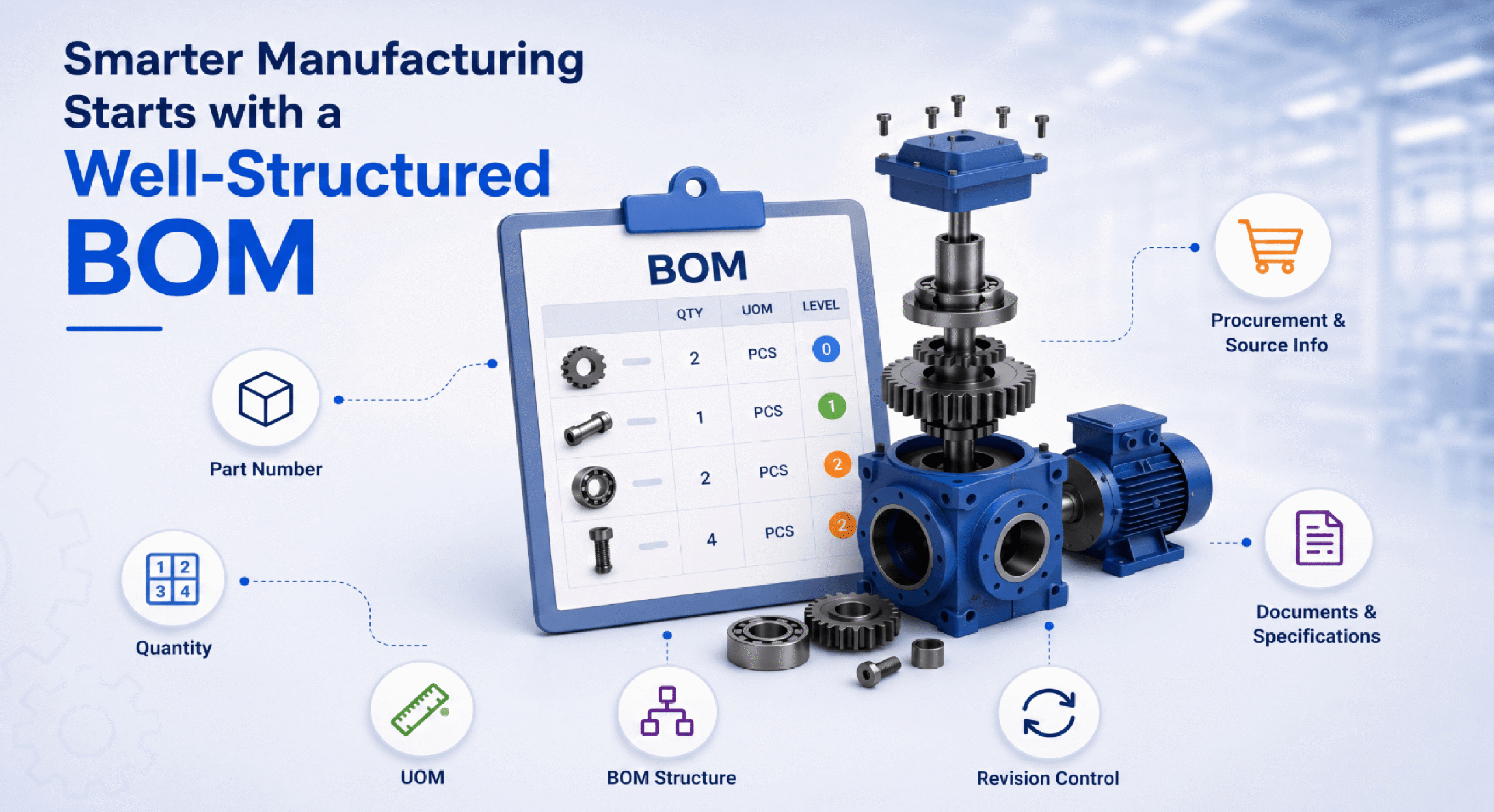
Duplicate customer records, inconsistent item numbering conventions, outdated supplier information, and bills of materials that were never fully updated after engineering changes all need to be identified and corrected before migration, not after. If a manufacturer migrates messy data into a new system without cleaning it first, the new ERP simply inherits the same data quality problems that existed in the old system, except now those problems are baked into a system the whole company is depending on for accurate planning.
The labor cost of this cleanup is frequently underestimated because it falls on internal staff, people who already have full-time jobs running the business day to day, rather than being fully outsourced to the implementation partner. Manufacturers need to budget realistic internal hours for data cleanup, not assume the vendor's data migration service covers everything, since most implementation partners handle the technical migration but expect the manufacturer to own the actual data quality work.
Customization and Configuration Beyond the Base Scope
ERP systems are designed to be configured for a manufacturer's specific processes, but almost every implementation reveals gaps between what the base system does out of the box and what the manufacturer's actual operations require.
During the sales process, it is easy to see a demo that shows the software handling processes smoothly, without fully realizing how much configuration work sits behind that demo, or how many of the manufacturer's specific workflows will require additional customization to replicate. A manufacturer with a unique quality inspection process, a nonstandard costing method, or an industry-specific compliance requirement often discovers mid-implementation that the base configuration does not fully cover their needs, and additional development or customization work is required.
This additional work almost always costs more than expected, both in direct fees to the implementation partner and in the additional time it adds to the project timeline. Manufacturers who go into implementation assuming the base system will handle everything without any custom development tend to face the largest budget surprises here.
The way to manage this risk is thorough process mapping before the contract is signed, not after. Documenting actual current workflows in detail, including the exceptions and edge cases that make a manufacturer's operation unique, and reviewing that documentation against what the base ERP system actually supports, surfaces most of these gaps early enough to budget for them properly rather than discovering them mid-project.
Training Time and Lost Productivity
The direct cost of training, trainer fees, training materials, session time, is usually accounted for in an ERP implementation budget. What gets missed is the indirect cost: the productivity loss that happens while employees are learning a new system and are, by definition, less efficient than they were on the system they knew well.
This productivity dip is real and measurable, even if it rarely shows up as a line item in the implementation budget. Employees who used to process transactions quickly in a familiar system now need more time to complete the same tasks in an unfamiliar interface, following new steps, double-checking their work, and asking colleagues or the help desk for guidance. This slowdown typically lasts weeks to months after go-live, depending on how complex the role and how well the training was structured.
Manufacturers often underestimate how long this productivity dip lasts, assuming employees will be back to full speed within a week or two of go-live, when the reality is often closer to a full quarter for complex roles like production planning or costing. Budgeting for this means either planning for temporarily reduced output during the transition period, bringing in temporary support staff to cover the gap, or building extra buffer into production schedules and customer delivery commitments during the go-live window.
Change Management and Internal Resistance
ERP implementations fail or underperform far more often because of people problems than technology problems, and the cost of managing organizational change is one of the most consistently underestimated line items in any implementation budget.
Employees who have used a legacy system for years, sometimes decades, often resist a new system even when it is objectively better, simply because change is uncomfortable and the old system is familiar. This resistance shows up as employees working around the new system, reverting to old habits like tracking things in personal spreadsheets, or simply disengaging from proper use of the new platform, all of which undermine the data accuracy and process discipline the ERP system depends on to function well.
Managing this well requires dedicated change management effort: clear communication about why the change is happening, visible executive sponsorship, identifying and empowering internal champions within each department who can model good system usage and support their colleagues, and addressing resistance directly rather than hoping it resolves itself over time. This work takes real hours from people, often the same operational leaders who are also busy running the day-to-day business, and it rarely gets budgeted as its own distinct cost.
Manufacturers who treat change management as a formal, budgeted workstream rather than an afterthought consistently see faster adoption and fewer of the manual workarounds that quietly undermine ERP data integrity for years after go-live.
Business Process Reengineering
A genuinely effective ERP implementation is rarely just a technical swap of one system for another. It usually requires rethinking how certain business processes actually work, since the old process may have been built around the limitations of the legacy system rather than reflecting the best way to actually run that part of the business.
This process reengineering work, mapping current state, designing future state, and getting stakeholder alignment on new workflows, takes real time and often requires outside expertise if the internal team does not have strong process design experience. Manufacturers who skip this step and simply try to replicate their old processes exactly in the new system often end up with a configuration that fights against the ERP's natural strengths, creating ongoing inefficiency that persists long after go-live.
The cost here is partly direct, consulting time if outside help is brought in, and partly indirect, the internal leadership time required to actually design better processes rather than just digitizing old ones. Manufacturers who budget time for genuine process improvement during implementation, rather than treating it as a pure technical migration, tend to get significantly more value out of the new system.
Integration With Existing Systems
Very few manufacturers run their entire operation inside a single ERP system with no other software involved. CRM platforms, e-commerce systems, shop floor data collection tools, quality management systems, and industry-specific applications often need to connect with the ERP to avoid recreating the same data silos the new system was supposed to eliminate.
Integration work is frequently underestimated during initial budgeting because it depends heavily on the specific systems involved, and the complexity is not always obvious until the technical teams actually dig into what each system's API or data structure looks like. A seemingly simple integration between the ERP and an existing quality management system can turn into a significant development effort if the two systems were never designed to communicate with each other cleanly.
Manufacturers should inventory every existing system that needs to connect to the new ERP before finalizing the implementation budget, and get realistic integration cost estimates for each one rather than assuming integration will be simple or included in the base implementation scope.
Infrastructure and Hardware Upgrades
Cloud-based ERP systems have reduced this cost significantly compared to older on-premise deployments, but it has not disappeared entirely. Manufacturers running shop floor data collection, barcode scanning, or handheld devices connected to the ERP often discover that existing hardware is not compatible with the new system, or that network infrastructure on the production floor needs upgrading to support real-time data transmission from scanning devices back to the ERP.
This is a cost that is easy to overlook during software-focused budgeting conversations, since the implementation partner's quote typically covers software configuration and not necessarily an audit of whether existing hardware and network infrastructure can actually support the new system's requirements. Manufacturers should have their IT team or implementation partner assess hardware and infrastructure compatibility early in the process, ideally during the initial scoping phase, rather than discovering gaps once implementation is already underway.
Ongoing Support and System Administration
The cost of running an ERP system does not end at go-live. Manufacturers need internal capability, either dedicated staff or a clearly defined support arrangement with the implementation partner, to handle ongoing system administration: user access management, report building, minor configuration adjustments as business needs evolve, and troubleshooting day-to-day issues that inevitably come up.
Manufacturers sometimes budget carefully for the implementation itself but underestimate the ongoing cost of supporting the system afterward, whether that is an internal system administrator role, a support retainer with the implementation partner, or a combination of both. Without this ongoing support built into the budget, manufacturers often find themselves either paying for expensive ad hoc support requests after go-live, or letting the system slowly drift out of alignment with actual business needs because nobody has clear ownership of maintaining and adjusting it over time.
Testing and Quality Assurance Time
Thorough testing before go-live, making sure transactions flow correctly, reports pull accurate data, and integrations work as expected, takes significant time and involves people across multiple departments, not just the IT or implementation team. This testing phase is frequently compressed under project timeline pressure, especially when a go-live date has been publicly committed to and the project is running behind schedule.
Cutting testing time short to hit a deadline is one of the costliest mistakes manufacturers make, because issues that would have been caught in a controlled testing environment instead surface in live production, often causing operational disruption, incorrect transactions that need to be manually corrected, or a loss of user trust in the new system's accuracy right at the moment when trust matters most.
Budgeting realistic time and involving the actual end users who will work in the system daily, not just IT staff, in the testing process significantly reduces the risk of costly post-go-live surprises.
The Cost of a Rushed or Poorly Scoped Timeline
Many of the hidden costs described above compound when an implementation timeline is rushed or the initial scope was not realistic to begin with. Manufacturers under pressure to hit a specific go-live date, sometimes tied to a fiscal year end or an external deadline, often compress data cleanup, testing, and training into less time than these workstreams actually require, which increases the likelihood of post-go-live problems that end up costing far more to fix than the time saved by rushing.
A realistic implementation timeline, built with input from people who have actually run similar projects rather than an optimistic estimate driven by a desired go-live date, is one of the most effective ways to avoid the compounding hidden costs that come from rushing critical workstreams.
Consultant and Implementation Partner Scope Creep
Implementation partners typically quote a fixed number of hours or a fixed fee for the core implementation, based on the scope defined at the start of the project. In practice, almost every implementation encounters requirements that were not anticipated in that original scope, whether that is an unexpected customization need, additional data cleanup, or extra training sessions requested after go-live reveals gaps in user proficiency.
When these situations come up, manufacturers are often billed for additional consultant hours outside the original fixed fee, and because this work happens incrementally throughout the project rather than as one large visible cost, it is easy for the cumulative total to significantly exceed the original budget without anyone noticing until the final invoice. A change here, an extra training session there, a few additional hours to fix a configuration issue, and by the end of the project the actual consulting spend can run well past what was originally quoted.
Manufacturers can manage this by requesting very clear documentation of what is and is not included in the fixed implementation fee before signing, tracking additional hours and change requests actively throughout the project rather than only reviewing them at invoicing time, and building a specific contingency line item for consultant scope creep separate from the general project contingency.
How to Budget More Realistically
Manufacturers evaluating ERP implementation can reduce the risk of these hidden costs derailing the project by taking a few deliberate steps before signing a contract.
Get a detailed scope of work, not just a software quote. Push implementation partners for specificity on what is included in customization, integration, and data migration, rather than accepting a broad estimate that leaves room for scope creep once the project starts.
Build a contingency budget. Industry experience across ERP implementations consistently shows that actual costs run higher than initial estimates. Building in a contingency, commonly cited in the range of fifteen to twenty-five percent above the initial quoted cost, gives manufacturers room to absorb the hidden costs described here without a budget crisis partway through the project.
Involve the people who will actually use the system in planning, not just IT and leadership. Employees who do the day-to-day work often surface process gaps and edge cases that leadership and IT teams miss, since they are the ones who understand the operational reality of the business best.
Ask implementation partners directly about typical hidden costs. Experienced partners who have run many manufacturing ERP implementations can usually speak candidly about where their past clients have hit unexpected costs, and pulling that information out during the sales process leads to a more realistic budget than relying solely on the initial proposal.
Treat change management as a formal, budgeted workstream. Assign real ownership and real hours to communication, training reinforcement, and addressing resistance, rather than assuming it will happen organically alongside the technical implementation.
Final Thoughts
The sticker price of an ERP system rarely reflects the true cost of getting that system fully implemented, adopted, and running well. Data cleanup, customization beyond base scope, training-related productivity loss, change management, process reengineering, integration work, infrastructure gaps, ongoing support, and adequate testing time all represent real costs that manufacturers frequently underestimate or miss entirely during initial budgeting.
None of this means ERP implementation is not worth the investment. It means manufacturers who go in with realistic expectations about the full scope of cost, not just the software license, end up with smoother implementations, fewer painful surprises, and a system that actually delivers the value it was purchased to provide. The manufacturers who struggle most are usually the ones who budgeted only for what was visible in the initial sales quote and got blindsided by everything that sits underneath it.
Frequently Asked Questions
What is the most commonly underestimated cost in ERP implementation? Data migration and cleanup is consistently one of the most underestimated costs, since manufacturers often assume the vendor's migration service covers full data quality work, when in reality significant internal effort is usually required to clean and standardize legacy data before it moves into the new system.
How much should manufacturers budget above the initial ERP quote? A common industry practice is building in a contingency of roughly fifteen to twenty-five percent above the initial quoted implementation cost, since actual costs across data cleanup, customization, and training consistently run higher than initial estimates.
Does cloud ERP eliminate hidden infrastructure costs? Cloud ERP significantly reduces infrastructure costs compared to on-premise systems, but manufacturers using shop floor devices, barcode scanners, or handheld hardware may still need to upgrade equipment or network infrastructure to fully support the new system.
Why does training cost more than the direct trainer fees suggest? The direct cost of training sessions is usually budgeted correctly, but the indirect cost of reduced employee productivity during the weeks or months it takes to reach full proficiency in the new system is frequently left out of the budget entirely.
How can manufacturers reduce the risk of hidden ERP costs? Getting a detailed scope of work rather than a broad quote, building in a realistic contingency budget, involving actual end users in planning, and treating change management as a dedicated, budgeted workstream all significantly reduce the risk of hidden costs derailing an implementation.