The Raspberry Pi SIGINT Station: Capturing ACARS Transmissions

Aircraft chatter is constant, and we’re going to show you how to listen in.
If you’ve been reading for a while, you already know that we are firm fans of the Raspberry Pi. While the value equation is different to what it was in the past, it’s still a great system for deploying projects quickly and easily.
Despite this, with plenty of software available and reasonably economical power requirements, the Pi can still deliver a punch far beyond its weight in some circumstances where form factor and power requirements become part of the equation for deployment.
Today, we’re going to use the SDR-optimised Dragon OS to set up and run a station to intercept ACARS traffic to see what we can find. Let’s go!
If you don’t have a Raspberry Pi that is configured and set up, you can use this tutorial to get started. The instructions are the same, simply replace Raspberry Pi OS with the SDR-focused Dragon OS and configure your network post-install. ACARS is the aviation version of SMS. Sent in cleartext, most traffic is routine, but you occasionally find some gems. Source: Wikipedia.
What Is ACARS?
ACARS (Aircraft Communications Addressing and Reporting System) is a digital data link system used by aircraft to automatically transmit short messages between the aircraft and ground stations, similar to the way we use text messaging.
Instead of relying on voice radio, ACARS sends structured data over VHF, HF, or satellite links for things like flight status updates, position reports, weather requests, and maintenance data.
From an RF perspective, it’s a constant, low-bandwidth stream of operational telemetry. It’s structured, predictable, and relatively easy to intercept and decode with SDR tools.
It’s also in use globally, making it a useful entry point for understanding real-world aviation communications beyond the typical ADS-B installs that most use as an entry point.
Hardware Requirements
With planes travelling at altitude, we get a broad footprint and a strong signal from the onboard transmitter. So, while ACARS signals are easy to detect, the real challenge is establishing clean, reliable captures that aren’t overdriven. To do this, we’ll optimise the entire stack right from the start.
Here are the essential requirements:
Raspberry Pi (3 or newer)
The main processing unit. A Pi 4 is ideal for stability and some additional headroom, but a Pi 3 will handle ACARS just fine if that’s all you have.
RTL-SDR (USB dongle)
The RF front end. Anything based on the RTL2832U chipset will work, but units with a TCXO are noticeably more stable. Use one with an SMA fitting to keep things simple.
Antenna tuned for VHF Airband (131 MHz)
This is the piece that a lot of people underestimate. ACARS lives around 131 MHz, so a generic antenna will work, but not as well as a dedicated one will. Even a basic quarter-wave cut for the band is a big improvement.
Coax + adapters
Whatever is required to actually connect your antenna to your SDR (SMA is common). This is often overlooked until the last minute. To save you some future drama, grab a coaxial adapter kit.
This is the basic barrier to entry. However, we want to optimise our signal to be consistently clean, so it’s worth adding a few additional pieces.
You won’t need these to get started, but they are nice to have:
Band-pass filter (VHF airband)
Cleans up out-of-band noise and interference. Useful in urban RF environments with a high noise floor.
LNA (Low Noise Amplifier)
Helps if the signal is weak, but only really beneficial if placed close to the antenna. We want to optimise signal, not noise.
USB Extension Cable
Helps to reduce induced electrical noise from the Raspberry Pi and onboard USB bus. A short cable extension to allow the RTL to work will help. If you don’t have one already, pair it with a shielded enclosure for maximum rejection of interference.
Remember, the Pi + RTL combo is simply the hardware that allows us to perform the capture. The best results beyond this come from an optimised antenna with a clear view of the horizon at a good elevation.
With the hardware sorted, we can move on to the Software side of things.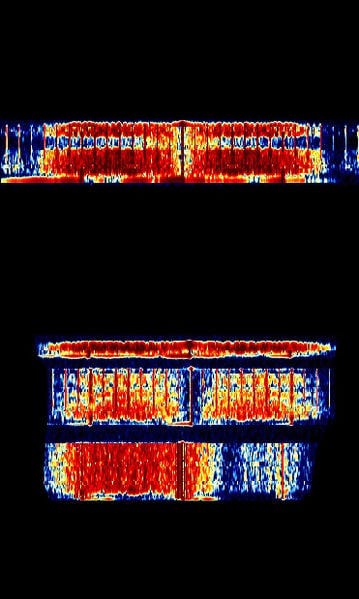 acarsdec relies on the terminal; however, we can see what it looks like on the waterfall thanks to the sigid wiki. Source: sigidwiki.com
Capture & Decode With acarsdec
Part of what makes Dragon OS so useful is the sheer range of tools that are available in the standard configuration. While we could run this on the default Raspberry Pi OS, Dragon allows us to deploy from the command line with a few simple commands rather than doing dedicated installs.
So, we’ll need to connect an antenna to the RTL-SDR before connecting it to the Raspberry via USB. When it’s done, ensure you have a view of the sky so that we can test it prior to the final installation.
When that’s done, we’ll need to ensure you’re capturing on the right frequency for your designated global region. For this, you can use Google to search against your location, but in most regions, you can start with a couple of frequencies.
131.550 MHz — Primary global (SITA)
129.125 MHz — Widely used (ARINC, heavy traffic in NA)
Now that this is complete, we can open up a terminal and then capture using the following command. Be sure to enter the directory for acarsdec first:
acarsdec -r 0 -g 40 -o 4 131.550 > acars_log.csv
There are a few flags there, so it’s worth being clear on exactly what it is we are calling and, more importantly, why we are doing so.
acarsdec - the original package

-r 0 - RTL-SDR device index (0 = first SDR plugged in)

-g 40 - Gain settings (adjust to optimise decode rate via sensitivity)

-o 4 - Log Output format (Structured/CSV format)

131.550 - The primary capture frequency

acars_log.csv - The end capture file
While you’ll need to optimise things like receiver gain relevant to your own environment, doing this will allow us to build a complete dataset that is able to be analysed via LLM or scripting later on.
Rather than simply viewing captures via the terminal in real time, we can build an interesting dataset that allows us to understand aircraft movements, patterns and the myriad of interesting events that come with them.
Note: The legality of ACARS interception varies according to your location. While they are unencrypted, some places may prevent legal interception. Check the laws applicable to your region before you start to ensure you’re staying legal.
Message Structure
A decoded ACARS message follows a consistent structure. Once you know what each field means, it becomes readable quickly.
Every message will contain some information that we can expect to see:
Aircraft Registration: The tail number. This identifies the specific airframe transmitting the message.
Flight Identifier: The airline and flight number associated with that registration at the time of capture.
Ground Station Address: The station the aircraft is communicating with.
Message Label: A two-character code that tells you the message type before you read the
content. Common ones include:
10 - Free text message
H1 - Position report
Q0 - Link integrity ping (keep-alive)
Content Block: The actual message payload. This can be an automated format similar to telemetry or a complete, custom message.
Block Identifier & Checksum: Closes the message and confirms it arrived intact.
Most captures will be routine operational traffic like gate assignments, schedule information or weather uplinks, but the structure is consistent enough that at volume, patterns emerge quickly.
That’s where it gets interesting.
Over To You
Once you’re at this point, you should be able to regularly capture ACARS packets from aircraft within your vicinity. However, it’s worth pointing out that realistically, this is simply a starting point. What you do with it next is entirely up to you.
Tools exist to merge ACARS with ADS-B and then display them on an overlay, which helps to give a much more detailed picture than a simple flight tracker would. Alternatively, projects exist to help give decoders a global view of all activity, similar to the ADS-B flight trackers that are currently in use.
It’s also worth mentioning that VHF ACARS was the only tool that we took a look at today. There is also a High Frequency system that allows for global propagation of messages for aircraft that are travelling outside of VHF range.
Radio Hackers has always lived at the intersection of technology and privacy, and along the way, we’ve always highlighted the fact that when open source data is combined, we can capture snapshots that tell us far more than a single source ever could.
Invoking data sources like ACARS helps us to build out these concepts in a tangible and realistic way. While ACARS alone isn’t going to give us a significant picture change, when we pair it with the addition of ADS-B and HF ACARS, or even satellite ACARS, we start to get a very different picture of the global aviation network.
This is the golden lesson to take away regarding how aggregation and enrichment can work. A single VHF ACARS node can help our overall picture, but aggregating it with other sources is where things really start to shine.
Taking this lesson into the future becomes particularly helpful as we tackle future projects.
Investigator515 explores the RF spectrum, cybersecurity, and the hidden tech behind modern espionage.
Follow for new content weekly
Bluesky • X • Substack
You might also like,
- Your First SIGINT Toolkit For Under $100.00
- Hidden Trackers: 5 Ways Your Tech Betrays You
- The Night Stealth Fell: The Story Of Vega-31