How the “C + A” Trading Tool Works
A Clean & Focused Momentum–Trend Confirmation System
In modern trading, clarity is often more valuable than complexity.
The C + A tool was designed with this philosophy in mind: remove unnecessary visual noise, hide common indicator names, and present only what truly matters for decision-making.
This article explains how the C + A tool works internally, how to read its signals, and how traders can integrate it into a disciplined trading strategy.
1. Core Structure of the Tool
The tool consists of two main components:
- C (Momentum Engine)
- Internally based on the Commodity Channel Index (CCI), but intentionally renamed to “C” to keep the system neutral and proprietary.
- A (Trend Strength Filter)
- Internally based on the Average Directional Index (ADX), renamed to “A”, used only as confirmation—not as a direct entry signal.
Both components are calculated in real time and displayed in a separate indicator window, along with a compact signal panel.
2. The “C” Component – Momentum Detection
What C Measures
The C value measures price momentum relative to its recent average.
It answers a simple question:
Is the market pushing strongly in one direction, or is it ranging?
Key Levels
The system uses two critical thresholds:
- +100 → Bullish Momentum
- –100 → Bearish Momentum
These levels are not arbitrary—they represent statistically significant momentum expansion.
Signal Logic
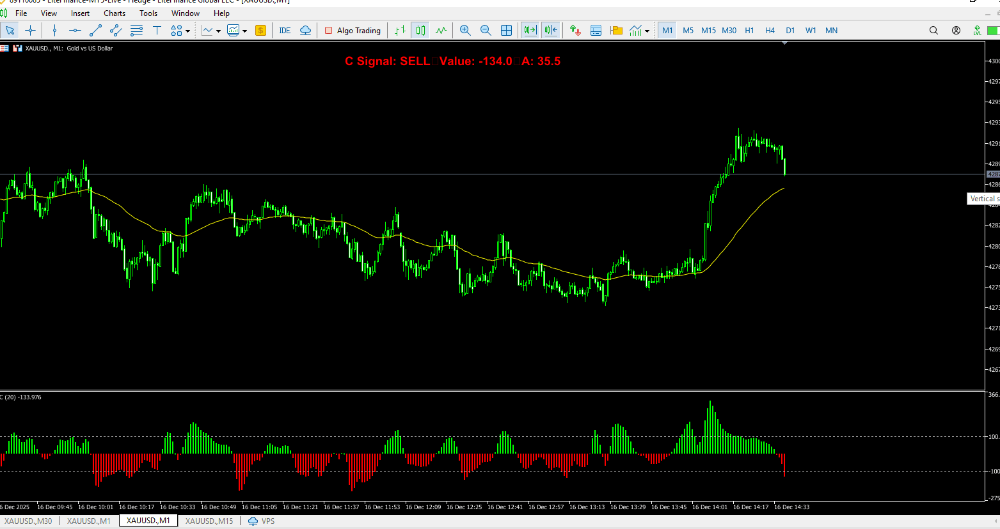
- C > +100 → BUY bias
- C < –100 → SELL bias
- Between –100 and +100 → NEUTRAL (no trade zone)
To reduce noise:
- A smoothing algorithm averages recent values
- Optional closed-candle logic prevents repainting
The histogram changes color automatically:
- Green when C ≥ 0
- Red when C < 0
This allows traders to visually assess momentum strength at a glance.
3. The “A” Component – Trend Strength Confirmation
While C tells you direction, A tells you quality.
What A Measures
The A value measures trend strength, not direction.
A higher A value means:
- The market is trending clearly
- Signals from C are more reliable
A lower A value means:
- Choppy or sideways conditions
- Higher probability of false signals
Important Note
The tool does not force entries based on A.
Instead, A is displayed transparently in the panel so the trader can decide:
“Is this momentum signal happening in a strong trend or not?”
This separation keeps the system flexible and discretionary, rather than over-optimized.
4. Signal Panel – Clean Decision Interface
The built-in panel displays:
- C Signal: BUY / SELL / NEUTRAL
- C Value: exact momentum value
- A Value: real-time trend strength
Color logic:
- Green panel → BUY
- Red panel → SELL
- Yellow panel → NEUTRAL
This allows traders to:
- Scan multiple charts quickly
- Avoid over-analyzing raw indicator data
5. Alert System – Precision, Not Spam
Alerts are triggered only when a true momentum break occurs:
- BUY alert → C crosses above +100
- SELL alert → C crosses below –100
Anti-spam protections include:
- One alert per candle
- No repeated alerts for the same signal
- Sound + popup notification
This makes the tool suitable for:
- Manual trading
- Semi-automated execution
- EA integration
6. How to Use the C + A Tool in Practice
A common professional workflow:
- Direction
- Wait for C to break +100 or –100
- Confirmation
- Check A value to confirm sufficient trend strength
- Execution
- Enter on pullback, candle close, or lower timeframe confirmation
- Risk Control
- Always combine with fixed risk management and stop-loss rules
The tool is not a holy grail, but a high-quality decision filter.
7. Why the Indicator Names Are Hidden
Renaming CCI → C and ADX → A is intentional:
- Prevents indicator bias
- Encourages system-based thinking
- Protects proprietary logic
- Makes the tool easier to integrate into custom strategies and EAs
The trader focuses on signals, not indicator myths.
Final Thoughts
The C + A tool is built for traders who value:
- Clean charts
- Momentum-based logic
- Trend confirmation without clutter
- Professional-grade signal discipline
Used correctly, it becomes a reliable core component in both manual and automated trading systems.
👉 Full system explanation, EA integration, and updates:
🔗 Your EA blog link here https://ea-fx-gold.blogspot.com