How to Create a Solana Memecoin: Launch Your Token for Just 0.05 SOL in 3 Minutes

Some platforms charge around 0.5 SOL for Solana token creation, including 3 Revoke options.
And that's just for token creation. Add liquidity pool creation, and you're looking at 0.8–1 SOL total.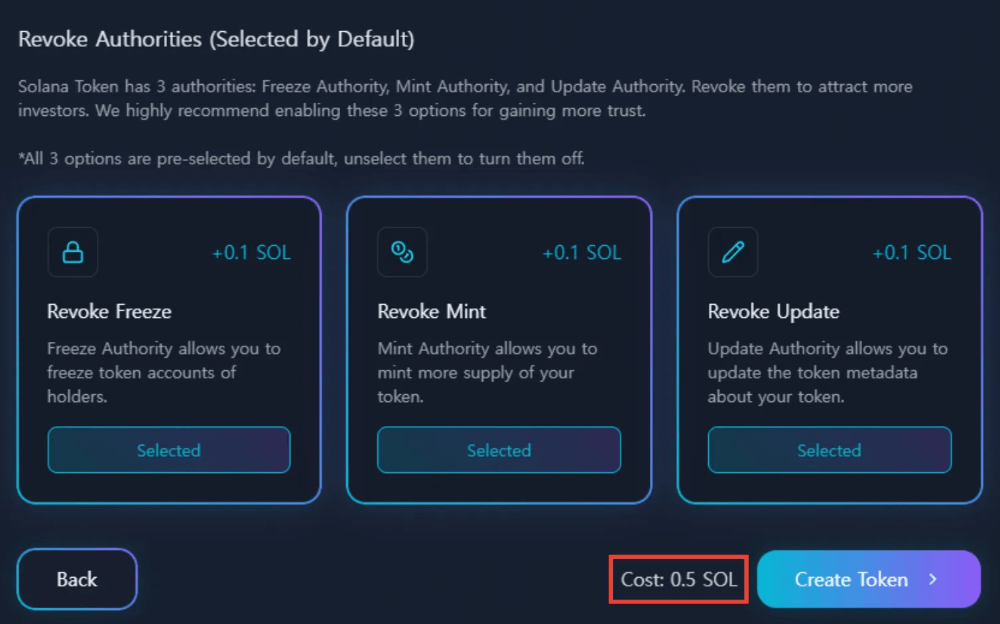
Unlike Ethereum or BNB Chain, every token uses the same standard (SPL Token). Only the name, symbol, and logo differ—the code is identical. There's nothing to develop. BONK, WIF, POPCAT—they all have the same structure. A trillion-dollar token and one you just created are technically no different.
So why pay 1 SOL, about $200? Because people don't know. Because they think it's hard.
With Alphecca, token creation to Raydium listing costs just 0.3 SOL total. Done in 3 minutes. Anyone can create their own memecoin and let people worldwide trade it.
This guide covers everything from start to finish: how to create a memecoin, how to list it on a decentralized exchange, and how to withdraw assets from your listed memecoin.
By the end, you'll understand exactly how memecoin creators make money.
What is a Memecoin?
Simply put, it's a "coin born from a meme".
You know Dogecoin? It started from a Shiba Inu meme. No special features. Just a meme. Yet its market cap is around $20 billion. One tweet from Elon Musk sends the price up 20%.
It's not just Dogecoin.
- BONK: Solana community meme → ~$2 billion market cap
- WIF: Dog wearing a hat meme → ~$3 billion market cap
- POPCAT: Cat with mouth open meme → ~$1 billion market cap
- PEPE: Frog meme → ~$4 billion market cap
What do they have in common?
Not technology—memes. People bought because it was funny, crowds gathered, and prices rose.
One well-made memecoin can generate more money than winning the lottery.
What You'll Need
Before creating a memecoin, you need three things.
1. Solana Wallet
There are several Solana wallets, but we recommend Phantom Wallet. It's the most widely used and most stable.
Installation:
- Go to phantom.app
- Install the Chrome extension (Firefox and Edge also supported)
- Click "Create New Wallet"
- You'll see 12 recovery phrases. Write them down immediately.
- Confirm recovery phrases and set password
Takes 3 minutes.
Important: Never share your recovery phrases with anyone.
Anyone with your recovery phrases can access your wallet. Don't save as screenshots—write on paper and store safely. 90% of hacks start from leaked recovery phrases.
2. Solana (SOL)
You need to pay fees to create tokens. Solana network fees are paid in SOL.
How to buy Solana:
- Purchase SOL on exchanges like Coinbase, Kraken, or Binance
- Send purchased SOL to your Phantom wallet
How much you need:
- Token creation only: 0.1 SOL is enough
- Including DEX listing: At least 1 SOL (liquidity amount + fees)
Your wallet address is at the top of the wallet app. Copy the address and paste it into the exchange withdrawal address. Transfers usually complete within 1 minute.
3. Token Information
Decide these before creating your token:
ItemDescriptionExampleLogo (Image)512x512 PNG recommended-NameFull name of your memecoinShiba SolanaSymbol3-5 character tickerSHISOLDescriptionIntroduction text-Total SupplyNumber of tokens to issue1,000,000,000DecimalsUsually 6 or 96
Unlike Ethereum and Binance Chain, Solana tokens store images and SNS information directly in the token code. This is why Solana is at the center of the memecoin boom, and why images and descriptions matter.
Naming tips: Good names are:
- Short and memorable
- Easy to pronounce
- Connected to memes or trends
Bad example: "SuperMegaUltraMoonRocketCoin" → Nobody remembers it
Good examples: "WIF", "BONK", "PEPE" → Memorable after hearing once
Ride existing trending memes. Don't try to create new ones. Memes people already know are far more advantageous.
Creating a logo: Make your own or use AI tools:
- Midjourney
- Leonardo AI (free)
- Canva
Save in 512x512 PNG format. Transparent background is better.
How to Create a Memecoin
Once prepared, let's create your memecoin.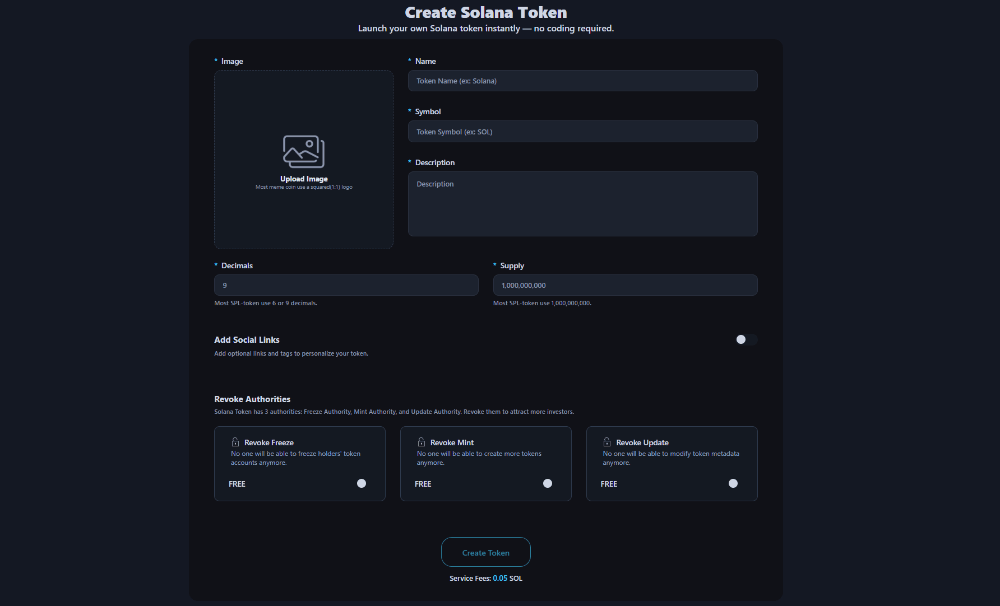
- Go to Token Creator
- Click "Connect Wallet" in the top right → Connect Phantom wallet
- Enter token information:
- Token Image: Meme image representing your memecoin
- Token Name: (e.g., Shiba Solana)
- Token Symbol: (e.g., SHISOL)
- Token Description: Description of your memecoin
- Decimal Precision: 6 or 9 (most Solana memecoins use these)
- Total Supply: Total supply (e.g., 1000000000)
- Click "Create Token"
- Approve transaction in Phantom wallet
Click the Transaction Log tab to see your created memecoin's token mint address.
How to check memecoin on-chain data:
- Click Transaction Log tab
- Click the icon next to the token mint address to view on-chain data directly on SolScan
- View memecoin token info, holder count, transaction history
Your memecoin is created, but nobody can trade it yet. To enable trading, you need to create a liquidity pool.
Creating a Liquidity Pool
Now that your token is created, let's make it tradeable.
What is a Liquidity Pool?
Just creating a memecoin doesn't mean people can trade it immediately. Trading requires a liquidity pool.
Simply put, a liquidity pool is pairing your memecoin with Solana and registering it on an exchange.
Here's an example:
- Put 100,000,000 SHISOL tokens and 10 SOL into the pool
- Now others can buy SHISOL with SOL, or sell SHISOL for SOL
- Price is automatically determined by the token/SOL ratio in the pool
This is the principle of AMM (Automated Market Maker). All decentralized exchanges (DEX) like Raydium, Uniswap, and PancakeSwap use this method.How to Create a Liquidity Pool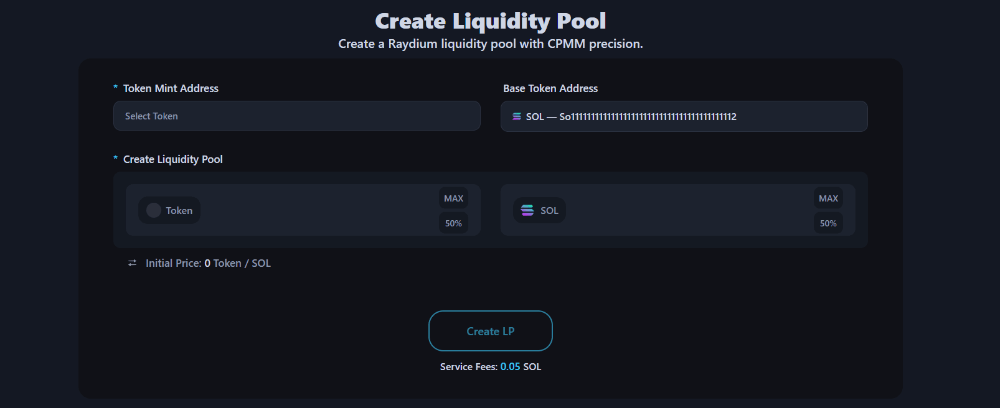
- Go to Create Liquidity Pool
- Connect your wallet
- Select token mint address: Once connected, you'll see a list of all tokens you hold
- Set liquidity: Enter the amount of tokens and Solana to put into the liquidity pool
- Click "Create LP" button
- Approve transaction in wallet
Click the Transaction Log tab to check on-chain data for the liquidity pool creation transaction.
Your token immediately becomes searchable on DEXScreener, DEXTools, Birdeye, etc. Now anyone in the world can buy and sell your token.
Calculating Initial Price
Initial price is determined by the ratio of Solana and tokens you put in.
Formula: Initial Price = Solana Amount ÷ Token Amount
Examples:
Solana AddedTokens AddedPrice per TokenMarket Cap (1B supply)1 SOL100,000,0000.00000001 SOL10 SOL (~$2,000)5 SOL100,000,0000.00000005 SOL50 SOL (~$10,000)10 SOL100,000,0000.0000001 SOL100 SOL (~$20,000)50 SOL100,000,0000.0000005 SOL500 SOL (~$100,000)
The more SOL you add:
- Higher initial price
- Higher market cap
- Lower price volatility (less slippage)
If you add less SOL:
- Lower initial price
- Small amounts move the price significantly
- Easier to pump but also easier to dump
Usually, start with around 1–10 SOL.
What are LP Tokens?
When you create a liquidity pool, you receive LP Tokens (Liquidity Provider Tokens). LP tokens are proof that "you provided liquidity to this pool." You'll need these LP tokens when removing liquidity later. Once the liquidity pool creation transaction completes, LP tokens automatically appear in your wallet.
Removing Liquidity
Once your token is listed, you may eventually want to withdraw your funds.
When to Remove Liquidity?
Cases where you need to remove liquidity:
- When ending the project
- When you want to recover your investment
- When moving liquidity to another pool
How to Remove Liquidity
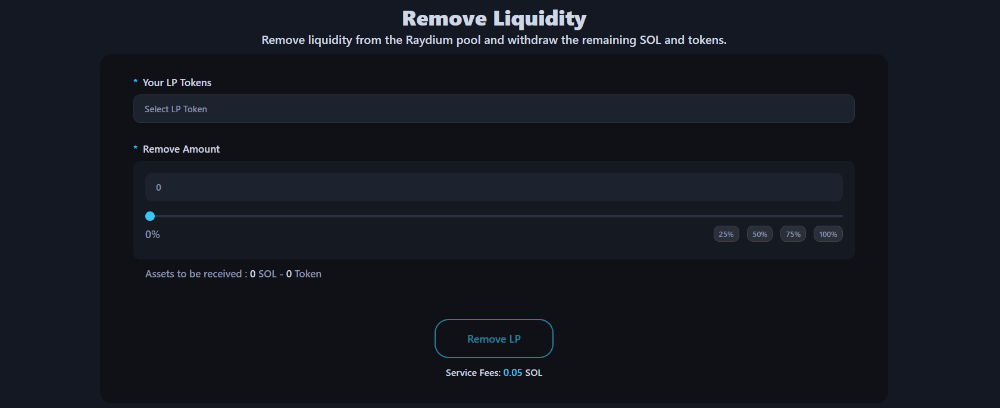
- Go to Remove Liquidity
- Connect wallet
- Select pool to remove from your LP token list
- Select removal percentage:
- 25% - Remove partial
- 50% - Remove half
- 75% - Remove most
- 100% - Remove all
- Click "Remove LP" button
- Approve transaction in wallet
- Done
Complete! SOL and tokens return to your wallet.
Amount You Get Back
You don't get back exactly what you put in.
As trades occur in the pool, the token/SOL ratio changes:
- If token price went up: You receive more SOL, fewer tokens
- If token price went down: You receive less SOL, more tokens
As long as the token creator doesn't sell tokens, the price cannot drop below the initial price.
Also, fee revenue is generated with each trade. This revenue is included in what you get back.
Important Notes
Don't get mistaken for a rug pull.
A rug pull is when developers collect investor money then suddenly drain liquidity and disappear.
When you remove liquidity:
- Token trading becomes impossible (if 100% removed)
- Token price crashes
- Investors suffer losses
For a legitimate project shutdown:
- Announce to the community at least 1 week in advance
- Clearly explain the reason for shutdown
- Give investors time to exit first
Cost Summary
ItemCostNotesPhantom wallet creationFree-SOL purchaseExchange feesVaries by exchangeToken creation0.05 SOLAlphecca feeLiquidity pool creation0.05 SOLAlphecca feeRaydium pool fee0.19 SOLProtocol feeOther gas costs0.02 SOLATA account rent, etc.
Total fees: 0.3 SOL ($60)
You'll also need additional Solana for liquidity. You can start with as little as 0.1 SOL.
FAQ
Do I need to know coding?
No. You don't need to know anything. Just click buttons.
Can I trade immediately after creating a token?
No. After token creation, you need to create a liquidity pool before trading is possible.
How much liquidity should I add?
From 0.001 SOL to any amount. The more you add, the more price stability you get.
Done in 3 minutes. Create your Token