Is a 55 Inch TV Good for Gaming? Features Gamers Should Check
A 55 inch TV can be an excellent choice for gaming if you want an immersive screen for console games, racing simulators, sports titles, action adventures, and multiplayer sessions. Its large display makes game environments feel more engaging, while a 4K resolution can help bring out fine details in textures, characters, and landscapes. However, screen size alone does not determine gaming performance. Features such as refresh rate, input lag, HDMI connectivity, resolution, and picture settings also influence the experience.
Whether you play on a PlayStation, Xbox, Nintendo Switch, gaming PC, or another compatible device, choosing the right television can make a noticeable difference. A suitable 55 inch TV can also serve as your primary screen for movies, streaming platforms, and everyday entertainment, making it a practical option for a shared living room.
For buyers considering a 55 inch TV from Akaiindia, understanding the features that matter most for gaming can help narrow down the options and make the purchase more worthwhile.
Is a 55 Inch TV Good for Gaming?
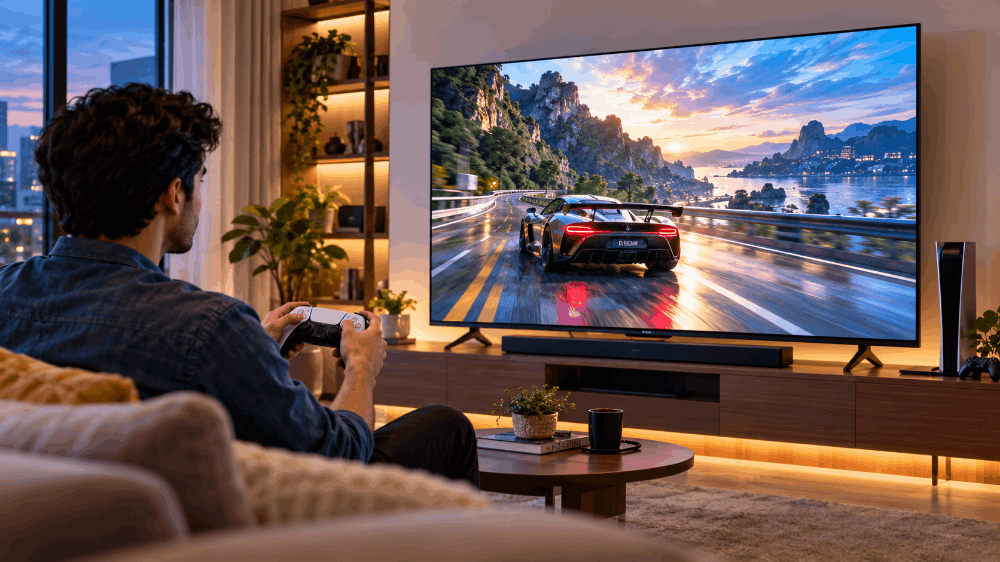
Yes, a 55 inch TV can be very good for gaming, particularly when you have enough space to sit at a comfortable viewing distance. The large screen provides a wider view of the game environment and makes visual details easier to appreciate from a sofa or gaming chair.
However, the best choice depends on the type of games you play, the console you own, and the television's specifications.
Benefits of Gaming on a 55 Inch TV
1. More immersive gameplay
A larger screen can make open-world adventures, racing games, football simulations, and action titles feel more engaging. You can appreciate environmental details and follow on-screen action without needing to sit directly in front of a small monitor.
2. A better shared gaming experience
A 55 inch television works well for multiplayer games played with friends or family. Everyone can view the action more comfortably than they might on a small desktop display, provided the seating arrangement and viewing distance are suitable.
3. Suitable for console gaming
Consoles such as the PlayStation 5 and Xbox Series X|S can work with compatible televisions through HDMI. A 55 inch TV with suitable resolution, responsive performance, and the required connectivity can provide an enjoyable console gaming setup.
4. One screen for gaming and entertainment
Unlike a dedicated gaming monitor, a television can also serve as a home entertainment display. You can switch between gaming, watching films, streaming series, and following live sports without needing separate screens.
Are There Any Limitations?
A large screen is not automatically better for every gamer. Competitive players who prioritise extremely high refresh rates, minimal input lag, and close-range viewing may prefer a dedicated gaming monitor.
A 55 inch TV also requires sufficient room space. If you sit too close, you may find it difficult to follow the entire screen comfortably, especially during fast-paced games.
The key is to select a television based on its actual gaming specifications rather than screen size alone.
7 Important Features to Check in a 55 Inch TV for Gaming
Before buying a 55 inch gaming TV, pay attention to the following features. They can help you understand which television is suitable for your console, favourite games, and budget.
1. Check the Screen Resolution: Is 4K Worth It?
Resolution determines how much visual detail a television can display. For a 55 inch screen, 4K resolution is an important consideration because the larger display benefits from having more pixels.
A 4K TV has a resolution of 3840 × 2160 pixels, while Full HD has a resolution of 1920 × 1080 pixels.
The additional pixels in a 4K display can produce sharper details in compatible games, including character textures, distant objects, and complex environments.
For example, when playing a visually detailed adventure game, a 4K television can help make landscapes, buildings, and smaller objects appear more defined when the game supports that resolution.
Which resolution should you choose?
- 4K: A strong choice for modern consoles and gamers who want detailed visuals on a large screen.
- Full HD: May suit casual gaming, older consoles, or buyers working with a tighter budget.
- Native resolution and supported input: Check whether the television accepts the resolution and refresh rate your gaming device outputs.
If you plan to use a PlayStation 5 or Xbox Series X, a 4K 55 inch TV is worth considering. Remember that actual resolution and performance depend on the game, console settings, and television specifications.
2. Understand Refresh Rate for Smoother Gameplay
Refresh rate refers to how many times a screen updates its image per second. It is measured in hertz (Hz).
A television with a 60Hz refresh rate refreshes its display 60 times per second. A compatible 120Hz television can refresh up to 120 times per second.
A higher refresh rate can make supported games appear smoother, particularly during fast camera movements, racing sequences, and competitive action.
Which refresh rate is right for you?
- 60Hz: Suitable for casual gaming, many story-driven games, sports titles, and games running at 30 or 60 frames per second.
- 120Hz: Worth considering for supported competitive games and players who want smoother motion at higher frame rates.
- Variable refresh rate (VRR): Can help reduce screen tearing and uneven motion when supported by both the television and gaming device.
Do not assume that every 55 inch 4K TV supports 120Hz simply because it has a 4K display. Check the native panel refresh rate and supported input modes. Motion-smoothing features advertised for films are not equivalent to a native 120Hz gaming display.
3. Look for Low Input Lag
Input lag is the delay between a command from your controller and the corresponding action appearing on the screen. Lower input lag generally makes games feel more responsive.
This feature is particularly important in competitive shooters, fighting games, racing games, and sports games where timing matters.
For instance, if you press a button to jump or change direction, excessive delay can make the controls feel less immediate. A television with good gaming responsiveness can help make the experience more natural.
Look for a dedicated Game Mode and independent input-lag measurements for the television model you are considering.
Game Mode commonly reduces image-processing operations that can add delay. However, the actual result varies by model and input settings.
Before buying an Akaiindia 55 inch TV, check the product specifications and available documentation for gaming-related features. If low-latency performance is a priority, look for independent testing of the exact model rather than relying on screen size or marketing descriptions.
4. Check HDMI Ports and Gaming Compatibility
HDMI connectivity determines how you connect your console, gaming PC, soundbar, or other entertainment devices to your television.
However, not all HDMI ports provide the same capabilities.
HDMI 2.1 features can enable higher-bandwidth gaming functions, including 4K at 120Hz, when the television and connected device support them. Some televisions have a mixture of HDMI port capabilities, so it is important to check the specifications of each port.
Before purchasing, check:
- The number of available HDMI ports.
- Whether the required port supports your console's resolution and refresh rate.
- Support for features such as VRR and Auto Low Latency Mode (ALLM), where needed.
- Whether the television supports the audio output connection you plan to use.
- Whether you will need to connect multiple devices simultaneously.
For example, if you own a PlayStation 5, a streaming device, and a soundbar, you should check whether the available ports can accommodate your setup without frequent cable switching.
If you mainly play casual games at 60Hz, you may not need every advanced HDMI gaming feature. Your decision should reflect your actual equipment and intended use.
5. Consider Picture Quality, HDR, and Brightness
Picture quality affects how clearly you can see objects, distinguish colours, and follow action in different gaming environments.
High Dynamic Range (HDR) can improve the range of brightness and colour in compatible games. It can make bright highlights and darker scenes appear more nuanced when the display has the capabilities to reproduce them effectively.
However, HDR support alone does not guarantee an impressive HDR experience. Peak brightness, contrast, colour reproduction, and tone mapping also matter.
When comparing a 55 inch TV for gaming, consider the following:
- Brightness: Helps maintain visibility in rooms with ambient light.
- Contrast: Affects how distinct dark and bright areas appear.
- Colour reproduction: Influences how natural or vivid game environments look.
- Screen reflections: Matter if you game in a brightly lit living room.
- HDR performance: Depends on both the television's display capabilities and the game's HDR implementation.
For example, horror games often rely on dark scenes, while racing games and colourful adventure titles benefit from accurate colours and clear highlights. The right display characteristics can improve both types of experiences.
6. Check Gaming Features and Picture Settings
Some televisions include gaming-focused settings that make it easier to configure the display for different games.
Depending on the model, useful features may include:
- Game Mode for reduced processing delay.
- ALLM for automatically switching to a low-latency mode.
- VRR for compatible variable-frame-rate output.
- Customisable picture settings.
- Support for different resolution and refresh-rate combinations.
Not every television includes all these features. Verify their availability before purchasing.
You should also know how to configure your television after installation. Enable Game Mode when available, select the correct HDMI input, and set your console to a supported resolution and refresh rate.
For competitive games, avoid unnecessary motion interpolation or image-processing effects if they increase input lag. For slower, story-driven games, you may prefer to experiment with picture settings to balance visual quality and responsiveness.
7. Choose the Right Screen Size and Viewing Distance
A 55 inch TV is generally measured diagonally across the screen, not horizontally. Its actual width and height depend on the display's aspect ratio and bezel design.
For a standard 16:9 screen, the display itself is approximately 48 inches wide and 27 inches tall, excluding the frame and stand.
Your seating distance influences how comfortable gaming feels. Sitting too close may require frequent eye or head movements, while sitting too far away can make interface text and small details harder to see.
For a 4K television, a viewing distance of around 5–7 feet can be a useful starting point for many living-room setups, although the ideal distance depends on personal preference, eyesight, game interface design, and room layout.
Before buying, measure the available wall or TV cabinet space and consider the location of your sofa, gaming chair, power outlets, and console.
Which Types of Games Work Well on a 55 Inch TV?
A 55 inch television can support several gaming styles, but the features you should prioritise vary by genre.
Story-Driven and Open-World Games
Games with expansive environments, cinematic scenes, and detailed characters can benefit from a large 4K display. Prioritise resolution, contrast, colour quality, and HDR performance.
Racing Games
Racing games involve rapid movement, changing camera angles, and quick reactions. A responsive Game Mode is important, while a higher refresh rate can be useful if the game and television support it.
Sports and Football Games
Sports simulations benefit from clear motion and responsive controls. Look for low input lag and suitable refresh-rate support. Picture quality also helps make stadiums, player movements, and pitch details more enjoyable to watch.
Competitive Shooters and Fighting Games
For competitive gaming, prioritise responsiveness above screen size. Low input lag is essential, and a 120Hz display with compatible 120fps support can be advantageous for games that offer it.
A gaming monitor may still be the better choice for players who compete seriously and prefer a smaller screen at close range.
Casual and Family Games
A 55 inch TV is a practical choice for family gaming, party games, and local multiplayer sessions. A comfortable viewing angle and sufficient seating space can be more important than advanced gaming specifications for this type of use.
55 Inch TV vs Gaming Monitor: Which Should You Choose?
The right choice depends on your gaming habits.
A 55 inch TV is generally better suited to sofa gaming, shared entertainment, and cinematic experiences. A gaming monitor is often more convenient for desktop setups and competitive players who sit close to the screen.
Choose a 55 inch TV if you want:
- A large screen for console gaming.
- A shared display for family and friends.
- One device for gaming, films, and streaming.
- A comfortable living-room entertainment setup.
Consider a gaming monitor if you prioritise:
- High refresh rates for competitive play.
- A compact desk setup.
- Close-range viewing.
- A display designed specifically for PC gaming.
Neither option is automatically superior. Compare the specifications, screen size, viewing distance, and price before making your decision.
How Much Should You Spend on a 55 Inch Gaming TV?
The price of a 55 inch TV varies according to resolution, display technology, smart features, refresh rate, connectivity, warranty, and brand.
Instead of choosing solely by the lowest price, identify the features you will actually use.
For casual gaming: Prioritise a good-quality display, suitable resolution, reliable HDMI connectivity, and Game Mode.
For modern console gaming: Consider 4K resolution, low input lag, and compatibility with the output modes your console supports.
For competitive gaming: Investigate native refresh rate, supported high-frame-rate inputs, VRR, and independently measured input lag.
For mixed gaming and entertainment: Balance picture quality, smart TV functionality, audio connectivity, and gaming responsiveness.
When evaluating Akaiindia's 55 inch TV options, review the specifications of the particular model, compare its supported gaming features with your console requirements, and check the current price, warranty coverage, and service terms.
A television with more features is not necessarily the best value if your games and devices cannot use them. Equally, paying a little more for a feature you will use regularly may be worthwhile over the television's useful life.
Common Mistakes to Avoid When Buying a 55 Inch Gaming TV
Avoid these mistakes before placing your order:
Buying based on screen size alone: A large display does not guarantee low input lag, high refresh rates, or good HDR performance.
Assuming every 4K TV supports 120Hz: Check the native refresh rate and supported HDMI input modes.
Ignoring console compatibility: Confirm that the television supports the output resolution and frame rates you intend to use.
Overlooking HDMI specifications: The number of ports matters, but the capabilities of each port matter just as much.
Expecting HDR support to guarantee premium picture quality: Check brightness, contrast, and real-world display performance.
Choosing a screen that is too large for the room: Measure the installation area and consider your seating distance.
Ignoring audio requirements: If you use a soundbar or external audio system, check the available connections and supported audio formats.
Skipping the warranty and service check: Review the applicable warranty, installation requirements, and after-sales service information before purchasing.
Frequently Asked Questions
1. Is a 55 inch TV too big for gaming?
No. A 55 inch TV can be suitable for gaming when you have enough room to sit comfortably and view the entire screen. It is especially practical for console gaming in living rooms and shared entertainment spaces.
2. Is a 55 inch 4K TV good for PS5 gaming?
Yes, a 55 inch 4K TV can be a good match for a PlayStation 5. Check the television's supported resolution, refresh rate, HDMI capabilities, and input lag. If you want to play compatible games at 4K and up to 120fps, verify that the specific TV supports the required input mode.
3. Is 60Hz enough for gaming on a 55 inch TV?
A 60Hz display is sufficient for many casual games, story-driven titles, and games running at 60fps or below. If you play competitive games and want higher frame rates, consider a compatible 120Hz television.
4. What is the ideal viewing distance for a 55 inch gaming TV?
For a 55 inch 4K television, approximately 5–7 feet is a reasonable starting point for many people. Adjust the distance based on comfort, screen visibility, and the type of games you play.
5. Do I need HDMI 2.1 for gaming on a 55 inch TV?
Not necessarily. HDMI 2.1-related capabilities can be important for features such as 4K at 120Hz and certain advanced gaming functions. For casual gaming at 60Hz, a compatible earlier HDMI connection may be sufficient.
6. Is a 55 inch TV better than a monitor for console gaming?
A 55 inch TV is often better for sofa gaming, cinematic titles, and multiplayer sessions. A monitor may be preferable for competitive gaming, close-range viewing, and desktop use. Compare responsiveness and supported features rather than relying on size alone.
7. Can I use a 55 inch smart TV for PC gaming?
Yes, provided the television supports the connection and output settings of your PC. Connect the computer using a compatible HDMI port, choose an appropriate resolution and refresh rate, and enable Game Mode if available. Check input lag and text clarity if you plan to use the screen for desktop work as well.
8. Which features matter most in an Akaiindia 55 inch TV for gaming?
Start with resolution, native refresh rate, Game Mode, input lag, HDMI compatibility, picture quality, and the features supported by your gaming device. Review the specifications of the exact Akaiindia model to confirm which capabilities are available before buying.
Conclusion: Is a 55 Inch TV the Right Choice for Your Gaming Setup?
A 55 inch TV can be an excellent gaming display for players who want an immersive screen, detailed visuals, and the flexibility to use one television for games and everyday entertainment. It works particularly well for console gaming, open-world adventures, racing games, sports titles, and multiplayer sessions.
The most important step is to look beyond screen size. Resolution, refresh rate, input lag, HDMI compatibility, HDR performance, and viewing distance all influence the experience. Casual players may find a well-equipped 60Hz television sufficient, while enthusiasts who want higher frame rates should investigate compatible 120Hz models and advanced gaming features.
If you are considering a 55 inch TV from Akaiindia, compare the available models against your console, gaming preferences, room dimensions, and budget. Check the product specifications and warranty details before making your final decision. Choosing a television that matches your actual requirements will help you build a gaming setup that delivers value for both playtime and everyday entertainment.
Ready to upgrade your gaming setup? Explore Akaiindia's 55 inch TV range, compare the features available on individual models, and choose a television that suits your gaming needs and home entertainment preferences.