Before You Click Approve: What a Solana Wallet Popup Is Actually Asking You to Sign
Back in 2021, in the BNB Chain meme coin months (it was still called BSC then), I watched people in trading groups lose tokens to approvals they had signed weeks earlier. "Revoke your approvals" became the reply to every sad post. When I started building on Solana, I went looking for the same approvals list in my wallet. It was not there, because Solana handles permissions differently.
What took me longer to see: some of the riskiest Solana instructions move zero tokens at the moment you sign. A delegate approval or an owner change sends nothing anywhere, so the balance preview in your wallet can show nothing at all.
A Solana prompt is a bundle of instructions that all succeed or all fail together. Your wallet shows you a summary of that bundle. Here is what I look for underneath.
Solana approvals live on the token account
On Ethereum and BNB Chain, the ERC-20 approve call lets a spender "withdraw from your account multiple times, up to the _value amount" (EIP-20). The allowance belongs to a token contract and a spender, and it stays until it is used up or overwritten by the next call. That is why the old advice was to revoke.
Solana keeps the permission on your token account. Each token account holds one optional delegate and a delegated_amount (token state source), so there is only one delegate at a time. Every transfer or burn the delegate makes is subtracted from that amount, and the program clears the delegate when it reaches zero (token processor source). A Revoke instruction removes it earlier.
What the program does not do is cap the amount. Approve sets delegated_amount to the number in the instruction without checking it against your balance. The amount can be larger than your balance, so it can cover tokens you receive later, until you revoke it. So revoking still matters on Solana. I think the real difference from Ethereum is only where the approval lives.
To check your own, open each token account on an explorer and look at the Delegate field. If one is set and you do not recognize it, a Revoke removes it.
What the balance preview can and cannot show
I use Phantom's wording here because its docs spell it out. Phantom simulates a transaction to "show you what assets may move in and out of your wallet", and the same post says the simulation "does not provide a guarantee" (Phantom on staying safe). Its Guard Instructions, built with the Lighthouse assertion program, block a transaction when the real outcome does not match the preview, though the post does not say every transaction gets them.
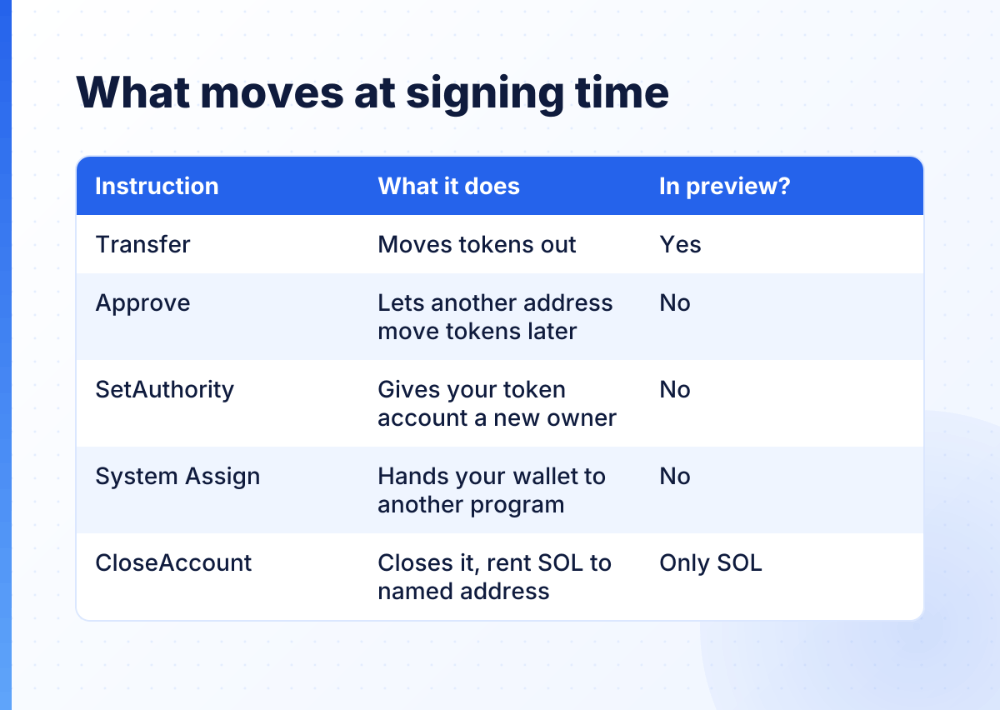
The bigger gap is simpler: a preview shows balance changes, and several of the instructions below change no balance at all when you sign.
The warning I respect most reads "This dApp could be malicious. Do not proceed unless you are certain it is safe." It appears when the wallet cannot reliably predict the outcome before execution. Honest apps can trigger it too. I still stop. If the wallet cannot tell what a transaction does, I want to know before I sign it.
One more trap is time. A normal transaction carries a recent blockhash, which stops being accepted after 150 blocks. A durable nonce transaction replaces that blockhash with a stored nonce and has no expiry window. A transaction you sign today can be sent later, when today's preview no longer matches your wallet. A related System instruction, AuthorizeNonceAccount, changes who may use a nonce account. If you never set one up, you have no reason to sign it.
Five instructions worth stopping for
- An unexpected
TransferorTransferChecked. It moves tokens out of your account, directly or through a delegate (token instruction source). If the site said "verify" or "claim", nothing should leave. ApproveorApproveChecked. Another address can move up to the approved amount later, without asking you again.SetAuthoritywith the AccountOwner type. Your token account now belongs to someone else, and the program clears any delegate when the owner changes. On the original SPL Token program, a token account's owner can still be changed this way (token instruction source). Token-2022 associated token accounts are created with an owner that cannot change. I compare the two programs in more detail in SPL Token vs Token-2022.- System
Assign. This one targets your main wallet account rather than a token account. It changes which program owns it, and it needs your signature, which is what the prompt is asking for. CloseAccount. The rent SOL goes to whatever address the transaction names, and that can be someone else's.
Check it on an explorer, before and after
Before you sign, Solana Explorer's transaction inspector decodes a serialized transaction or message and lists every instruction. Most people will never hold the raw bytes of a wallet prompt, so it helps most when a builder or a teammate sends you a transaction to sign.
After you sign, open the signature on an explorer and read each instruction, not only the balance changes. If you find an Approve or SetAuthority you did not expect, act now.
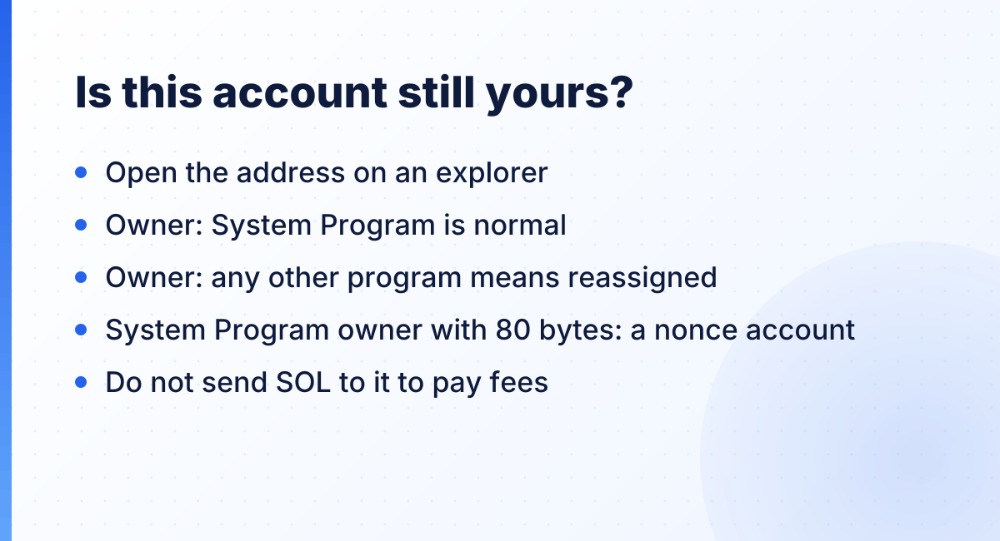
The warning "This account might be malicious" comes with a help page that tells you to check two fields on Solscan: Owner and Allocated Data Size. An owner other than the System Program suggests the address was reassigned to another program. A System Program owner with 80 bytes suggests a nonce account an attacker may control. SOL sent there may not be recoverable, the page warns, so do not send SOL to the compromised account "to pay fees". I have seen people do exactly that after a drain.
If you use a Ledger: as of November 2026, Solana clear signing in the Ledger Solana app 1.17.0 and above shows a transaction with many instructions as one readable intent, and falls back to blind signing with a warning when an instruction has no reviewed descriptor.
The airdrop in your wallet is the bait
Phantom's help center is plain about it: a token you do not recognize is usually spam. Fake airdrops land in your wallet to pull you onto an outside site, and "Phantom will never ask you to claim a reward" (common token scams). Among the warning signs it lists are links in token names or descriptions, and sites asking you to verify your wallet or claim a reward. Report the token as spam and it gets hidden.
Hiding is enough for most people. If you want it gone, burn it from your own wallet, for example with Tokenry's Solana token burner, never through the link in the token's name. (I build Tokenry, so that one is my own tool.)
I write transactions with many instructions for production tools, and I know the person signing sees only the wallet's summary of what I built. So when I am the user, I read the instruction list myself. My own rules:
- I never sign a prompt that started from a link in a token name.
- If the preview is empty but the site says "claim", I close the tab.
- Any
Approveor authority change on a site I did not go looking for is a no. - I try new sites from a fresh wallet with little in it.
- When something feels off, I read the instructions on an explorer.
What is the strangest prompt your wallet has shown you, and did you sign it?