The Hidden Trail: How MAC Addresses Reveal Real-World Locations via OSINT

Today, we live in an age of big data. ANPR tracks our vehicles, while big tech has been caught with its hands in the privacy cookie jar on more than one occasion over the past few years.
Big data can work both ways, though. Using OSINT and crowd-sourced aggregation techniques, analysts and researchers have the potential to leverage huge amounts of useful data that have some surprisingly intricate uses.
Today, we’ll be taking a look at Medium Access Control (MAC) Addresses and exploring the role they play in managing our modern devices.
We will also check out some crowd-sourced tools that you can use for data enrichment. Despite MAC randomisation, savvy analysts can still obtain plenty of information in some circumstances. Source: Wikipedia.
Understanding Mac Exposure
A unique identifier used by a network interface controller, MAC addresses are used for communication within a network segment. Easily recognisable as six groups of two hexadecimal digits, separated by hyphens, colons, or without a separator, hardware manufacturers usually assign MAC’s which are “burned in” during production.
A fixed MAC address might not be a problem in a static location, but it comes with some distinct privacy concerns if you’re using something like a smartphone. This is partly because MAC information is included in network probe requests that are used to help devices move between known networks.
Because of this, it’s not uncommon to see MAC randomisation be used to offset some of these concerns. As simple as it sounds, some devices will now randomise the address at intervals to help improve privacy concerns.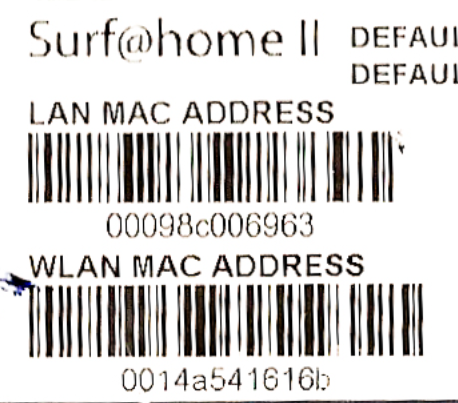 MAC address information is usually added at the manufacturing stage. Source: Wikipedia.
While smartphones are the prime users of this strategy, it’s worth mentioning that Bluetooth and IOT devices will sometimes have no such protections in place. This means that while everything can be detected in your local environment using the right hardware, some devices are going to be far easier to track and enumerate than others.
Pro Tip: In high-density environments, a single Wi-Fi card will struggle to capture everything due to slow scan rates. Use multiple cards assigned to selected channels and pair them with a GPS to increase your overall capture rate and accuracy.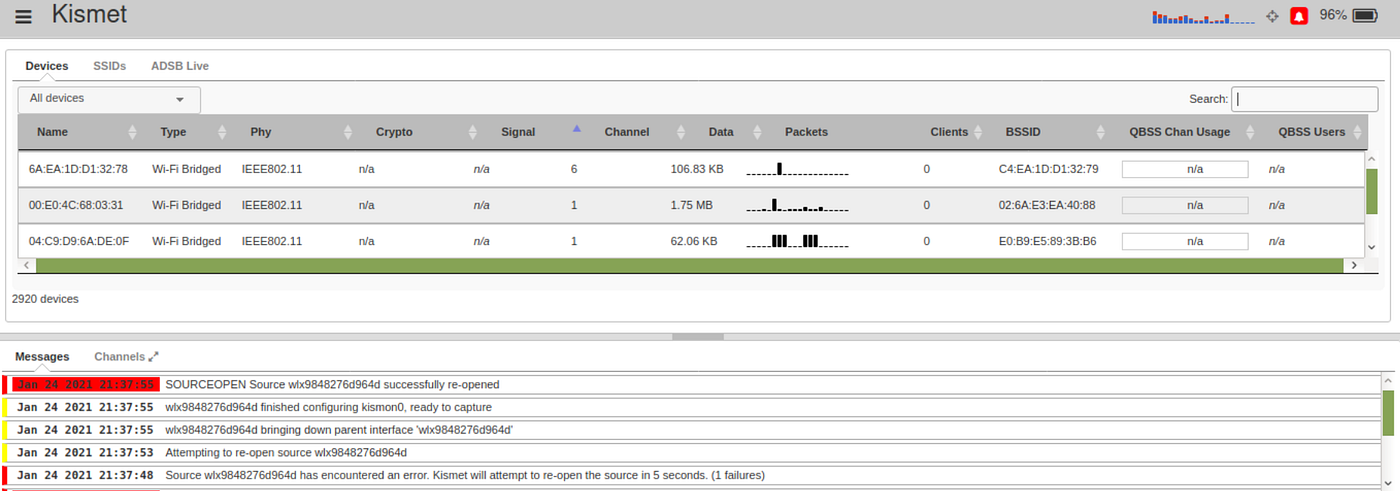 Kismet is a great tool for wardriving and data collection. Source: wikipedia.com
Wardriving & Data Aggregation
Hugely popular in the early days of Wi-Fi, wardriving is going through a modern resurgence during the age of IOT. Using a mixture of both hardware and software, wardrivers will map networks and devices with high accuracy, often sharing the data gathered to make the effort collaborative.
In the early days, the systems needed to do this would often be large and quite intricate. Now, thanks to modern hardware, you can do this with little more than a smartphone and the WiGLE app.
Originally created to draw attention to the need for good wireless security practices, the project expanded to include a full, global map of Wi-Fi hotspots and connected devices and would eventually grow further to include cell phone tower information, encryption modes and other useful data that can be used for investigative purposes.
It’s worth mentioning that, like a lot of other open-source data streams, the available wardriving data value has a direct relationship with the overall activity levels of a certain area.
Essentially, this means that areas that are more heavily populated will have far more data availability than quieter areas with less population density.
Despite this, we still have a few options for enriching any collected data.
Pro Tip: If you’d like to experiment with wardriving in the modern era, download the WiGLE app from the Play Store and give it a shot on your smartphone.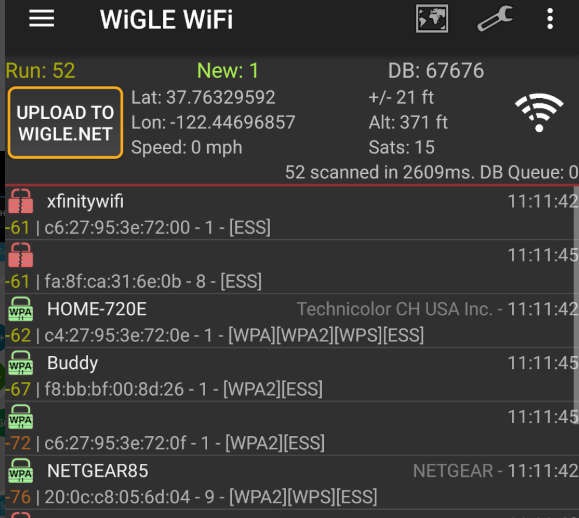 The WiGLE mobile app makes wardriving and data uploading extremely easy. Source: wikipedia.com
Data Enrichment via OSINT
Once we’ve collected our data, we can use OSINT strategies to expand our knowledge.
If you haven’t used a GPS during collection, we can use the databases in an attempt to geolocate stations of interest or expand the points on our dataset. While this isn’t always effective, this can still be a pretty useful source of information in some circumstances. It also has the potential to be reasonably accurate, too. In some instances, stations can be geolocated with an error of 30–50 meters.
One of the most useful tools for general enrichment is the database that gives us information on the identifiers used by manufacturers. A catalogue managed by the Institute of Electrical and Electronics Engineers (IEEE) Registration Authority (RA), it gives us a breakdown that is used to identify the device manufacturer by the first digits of the MAC address.
This is helpful from a cybersecurity perspective as it means that we can use the database to fill in many of the blanks that we might have around detected devices.
We can also use the database to do a form of reverse lookup. If you’re looking for a certain device from a specific manufacturer, the database can give you information on MAC ranges that are relevant to your target device.
As you’d imagine, in some circumstances, this can be an extremely useful tool. Try it for yourself by visiting this link.
Pro Tip: This can work well in reverse sometimes, too. If you have an SSID or MAC address but no location, you can attempt to geolocate it through tools like the WiGLE database. Be sure to play nicely, though.
Things To Remember
Like most things in life, developing research skills is directly proportional to the amount of effort you put into said development. So, it’s worth taking the time to understand how the collection of some of this information works at a big picture level.
While advertisers can, and do, use this type of information to serve up custom advertisements and track movement patterns within a certain area, they aren’t the only ones who can leverage this as data sources.
Using the information within the catalogue, we can use scripts and automation to find or exclude certain devices, while pairing this with knowledge of Wi-Fi probe requests can give plenty of interesting options around the tracking, identification and de-anonymisation of devices.
One of the easiest ways to start an upgrade of your skillset is to simply start experimenting with wardriving techniques in your local area. Not only will it teach you essential skills around the collection of this information, but it will also help fill in the unmapped gaps.
We can also understand randomisation strategies in greater detail by using software to spoof our own MAC information in a controlled network environment.
This allows us to understand randomisation at the network level, something you might find to be particularly useful if you’re interested in exploring wireless security in more detail.
Investigator515 explores the RF spectrum, cybersecurity, and the hidden tech behind modern espionage.
Follow for new content weekly
Bluesky • X • Substack
You might also like,
- OSINT Investigators Guide to Self Care & Resilience
- Spies In The Mud: The RF-111 Aardvark
- What The Tech?! Space Shuttles