Create AI Videos in Seconds: Sora 2, Veo 3, Runway & More Inside Overchat AI

The AI Video Revolution Is Here
Video content dominates the internet. TikTok, Instagram Reels, YouTube Shorts, and traditional long-form video are the primary ways people consume information and entertainment in 2026. But creating video has always been hard. You need cameras, editing software, lighting, actors, locations, and hours of post-production work.
Artificial intelligence has changed this. Today, you can generate professional-quality video from text descriptions, still images, or simple inputs. You can extend short clips into longer scenes. You can create faceless content for YouTube channels. You can generate TikTok dance videos without filming anyone. You can control motion and camera movement with AI precision.
The challenge is that powerful video generation tools are scattered across different platforms. Sora 2 is on one service. Veo 3 is on another. Runway has its own subscription. Seedance, Hailuo, and Wan AI each require separate accounts and separate payments. If you want to use multiple models to compare quality or access different features, you are looking at hundreds of dollars per month.
Overchat AI solves this by putting the best video generation models and tools into one platform with one subscription. For $49.99 per year, you get access to Sora 2, Seedance 2.0, Veo 3, Grok ImagineKling, Runway, Hailuo, Wan AI, and specialized video tools that make creation simple and fast.
What Is Overchat AI Video Generation?
Overchat AI is an all-in-one AI platform founded in 2024 in Tallinn, Estonia. It provides more than 150 specialized AI tools for image, video, and text generation, powered by the world's leading AI models. The video generation suite inside Overchat AI is not a single generic video maker. It is a collection of purpose-built tools, each designed for a specific type of video creation.
Instead of typing complex prompts into a chatbot and hoping for a good video, you open a dedicated tool with an interface built for that exact task. Want to turn a photo into a video? Use the Overchat AI Image-to-Video tool. Want to create a TikTok dance? Use the Overchat AI TikTok Dance Generator. Want to produce faceless YouTube content? Use the Overchat AI Faceless Reels tool.
Each tool handles the technical prompting internally. You provide the inputs. The AI handles the rest.
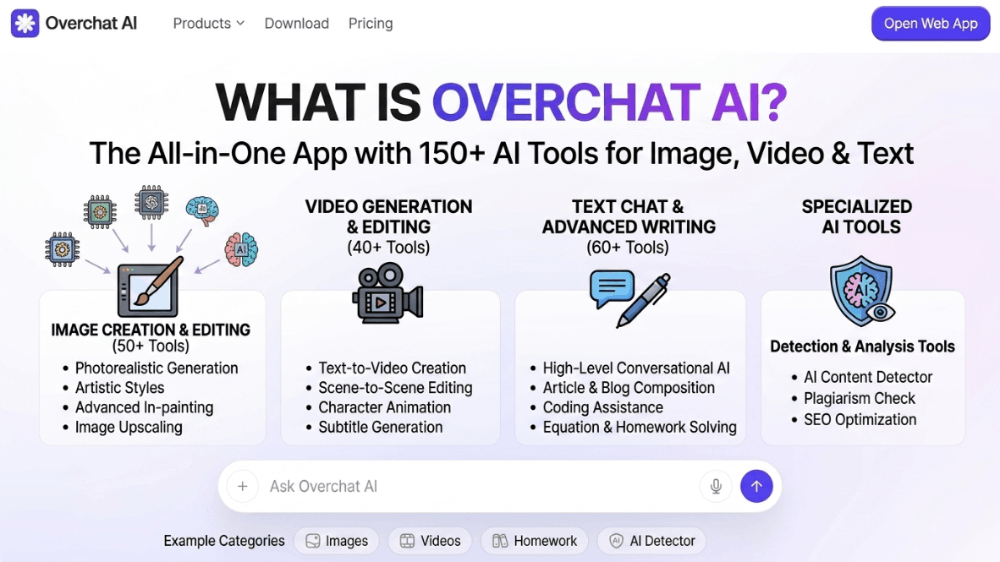
AI Video Models Available in Overchat AI
Overchat AI includes access to the most advanced video generation models available in 2026. These models power the specialized tools and can also be accessed for custom generation.
Sora 2 is OpenAI's latest text-to-video model. It produces highly realistic, cinematic video from text descriptions with improved physics, lighting, and temporal consistency compared to earlier versions.
Seedance 2.0 is ByteDance's advanced video generation model. It excels at creating dynamic, music-synchronized video content optimized for social media platforms.
Veo 3 is Google's next-generation video model. It offers exceptional detail, smooth motion, and strong adherence to text prompts with natural camera movements.
Grok ImagineKling is xAI's video generation system. It produces stylized and creative video outputs with strong character consistency across frames.
Runway is a leading creative suite for AI video. Its motion brush and camera control features allow precise creative direction.
Hailuo is a specialized model for high-resolution video generation with strong performance on complex scenes and multiple subjects.
Wan AI provides efficient video generation with fast processing times and solid quality for rapid content creation.
Instead of subscribing to each of these platforms individually, Overchat AI Pro gives you access to all of them through one interface for $49.99 per year.
Overchat AI Video Tools Explained
Overchat AI includes several dedicated video tools. Here is what each one does and how it works.
Overchat AI Text-to-Video
The Overchat AI Text-to-Video tool turns written descriptions into full video clips. You type what you want to see. For example, "a drone shot of a mountain lake at sunrise with mist rising from the water." The tool selects the best available model for your request and generates a video matching your description.
This is ideal for creating B-roll footage, conceptual scenes, stock video alternatives, and visual storytelling elements without filming.
Overchat AI Image-to-Video
The Overchat AI Image-to-Video tool animates a still image into a moving video. You upload a photo and the tool adds motion, camera movement, and environmental effects to bring it to life.
This is perfect for animating product photos, bringing portraits to life, creating dynamic social media posts from static images, and generating video content from existing photo libraries.
Overchat AI Video Extender
The Overchat AI Video Extender takes a short video clip and extends it into a longer sequence. If you have a 2-second clip and need 10 seconds, the tool analyzes the motion, style, and content, then generates additional frames that continue the scene naturally.
This is useful for creating longer content from limited footage, smoothing transitions, and generating extended B-roll for video projects.
Overchat AI TikTok Dance Generator
The Overchat AI TikTok Dance Generator creates dance videos synced to music. You upload or select a music track and the tool generates a video of a dancer performing choreography that matches the beat and rhythm.
This is popular among social media creators who need constant dance content for TikTok and Instagram Reels without hiring dancers or filming in studios.
Overchat AI Faceless Reels
The Overchat AI Faceless Reels tool creates YouTube Shorts and Instagram Reels without showing a human face. You provide a topic or script, and the tool generates video content using stock-style footage, text overlays, voiceover, and background music.
This is ideal for faceless YouTube channels, motivational content, educational shorts, and automated content channels where the creator prefers to remain anonymous.
Overchat AI Motion Control
The Overchat AI Motion Control tool gives you precise control over camera movement and object motion within generated videos. You can specify pan directions, zoom levels, rotation, and tracking movements.
This is valuable for filmmakers, advertisers, and creators who need specific camera language rather than random AI-generated motion.
Overchat AI YouTube Summarizer
The Overchat AI YouTube Summarizer is not a video generator but a video analysis tool. You provide a YouTube URL and the tool extracts key points, creates a summary, generates timestamps for important moments, and can even produce a text transcript.
This is useful for researchers, students, content creators analyzing competitors, and viewers who want to understand long videos quickly.
How to Generate a Video in Overchat AI
Creating a video with Overchat AI takes minutes, not hours. Here is the typical workflow.
First, choose your tool. Decide whether you want to generate from text, animate an image, extend existing footage, or use a specialized tool like the TikTok Dance Generator.
Second, provide your inputs. For text-to-video, write your description. For image-to-video, upload your photo. For faceless reels, enter your script or topic. The interface will show you exactly what inputs are needed.
Third, select your settings. Choose video length, aspect ratio, style preferences, and motion intensity if applicable. Some tools let you select which underlying model to use. If you are unsure, leave it on automatic and Overchat AI will route to the best model.
Fourth, click generate. The AI processes your request. Processing time varies by model and video length but typically ranges from 30 seconds to a few minutes.
Fifth, review and download. Watch the preview. If you like it, download the high-resolution version. If not, adjust your inputs and regenerate. Pro users can generate unlimited variations.
Use Cases for Overchat AI Video Tools
Social media creators use these tools to produce daily content for TikTok, Instagram Reels, and YouTube Shorts without filming equipment or editing software. The TikTok Dance Generator and Faceless Reels tool are especially popular for maintaining high posting frequency.
E-commerce businesses use image-to-video to turn product photos into dynamic video ads. A single product image can become a rotating showcase video with background music in under a minute.
Marketers use text-to-video to generate B-roll, promotional clips, and explainer footage without hiring videographers or purchasing stock footage subscriptions.
Educators use the YouTube Summarizer to break down long lectures into digestible summaries with timestamps. They also use faceless reels to create quick educational shorts.
Filmmakers and storytellers use video extender and motion control tools to prototype scenes, visualize camera movements, and generate placeholder footage during pre-production.
Small business owners use these tools to create professional video content for websites, social media, and presentations without any video production experience.
Quality Comparison: Overchat AI vs. Standalone Tools
The video models inside Overchat AI are the same models used by standalone platforms. The Sora 2 videos you generate inside Overchat AI are the same quality as Sora 2 videos generated directly through OpenAI's interface. The Runway motion control features produce the same results as Runway's native app.
The difference is convenience and cost. A standalone Runway subscription starts at $15 per month. Sora 2 access requires a ChatGPT Plus or Pro subscription at $20 to $200 per month. Veo 3 access requires a Gemini Advanced subscription at $20 per month.
Overchat AI Pro costs $49.99 per year and includes all of these models plus image tools, text tools, math solvers, and over a hundred other utilities. The quality is identical. The workflow is faster because everything is in one place. The price is dramatically lower.
Pricing and Access
All video tools and models mentioned in this article are included in Overchat AI Pro, which costs $49.99 per year or $14.99 per month. The subscription can be cancelled anytime.
Free users receive 100 tokens per day to try supported tools and basic models. Some video tools may be available for limited free use.
The platform is accessible on web at overchat.ai/web, iOS, and Android. Generated videos and project history sync across all devices.
Frequently Asked Questions About Overchat AI Video Tools
Do I need video editing experience to use these tools?
No. The Overchat AI video tools are designed for users with no editing experience. You provide inputs through simple interfaces. The AI handles generation, motion, transitions, and rendering automatically.
Are the videos generated by Sora 2 and Veo 3 inside Overchat AI the same quality as using those platforms directly?
Yes. Overchat AI provides access to the same underlying models. The output quality is identical. The difference is that you access multiple models through one interface instead of managing separate subscriptions.
Can I use these videos for commercial projects?
Yes. Overchat AI Pro users can use generated videos for commercial purposes including social media, advertising, marketing, and client work. Always review current terms of service at overchat.ai for any updates.
What video resolutions are supported?
Resolution depends on the tool and model used. Most tools support up to 1080p output. Some models offer 4K generation for Pro users. Specific resolution options are shown before generation.
How long can the generated videos be?
Length varies by tool. Text-to-video and image-to-video typically generate 4 to 10 second clips. The Overchat AI Video Extender can lengthen these. Faceless reels can be longer, often up to 60 seconds. Exact limits are shown in each tool interface.
Can I add music or voiceover to generated videos?
Yes. The Overchat AI Faceless Reels tool includes automatic voiceover and background music generation. You can also download videos and add audio separately, or use the Overchat AI audio generation tools for music and narration.
Is there a watermark on free videos?
Free tier videos may include watermarks depending on the tool and usage. Pro users receive unwatermarked, full-resolution video outputs.
Can I edit a video after generating it?
You can download generated videos and re-upload them to other tools for further processing. For example, you can extend a video clip, then convert it to a different aspect ratio, or extract frames for image editing.
Final Thoughts
Video creation no longer requires expensive equipment, professional editing skills, or hours of work. AI video generation has reached a point where anyone can produce compelling, professional video content from a text description or a single photo.
The problem was never the technology. The problem was access. Powerful models were locked behind separate paywalls, complex interfaces, and steep learning curves.
Overchat AI fixes this by giving you Sora 2, Veo 3, Seedance 2.0, Runway, and more in one platform. The Overchat AI Text-to-Video tool creates scenes from descriptions. The Overchat AI Image-to-Video tool animates photos. The Overchat AI Video Extender grows short clips.
The Overchat AI TikTok Dance Generator produces social content. The Overchat AI Faceless Reels tool builds anonymous channels. The Overchat AI Motion Control tool gives you directorial precision.
All of this is included in one subscription. One price. $49.99 per year.
If you create video content for social media, marketing, education, or entertainment, the time and money you will save are substantial. Try the free tier with 100 daily tokens and test the video tools yourself.
Ready to start creating? Visit overchat.ai and generate your first AI video today.
Overchat AI is developed by Spaceship Intelligence OÜ (Estonia) and Boiler Labs FZ-LLC (UAE). For inquiries, contact hello@overchat.ai.


![[English Translation] Prosecutor's Office Proposal Volume 2 - 6](https://cdn.bulbapp.io/frontend/images/f30b9188-5c76-4ce1-9b1e-372213b6057f/1)